

To use StoreCRM from an external AI client such as Claude or ChatGPT, connect toStoreCRM MCPusing OAuth. The previous integration using an AI API Credential and a dedicated skill ended on November 24, 2026. In the StoreCRM web app, you can still use theAIアシスタント.
1. Set up a custom MCP connection
サーバーURLは https://api.storecrm.com/mcp です。認証方式はOAuthを使用します。
- ChatGPT・Claudeでは、ワークスペースで許可されたカスタム接続の画面にサーバーURLを設定し、接続を開始します。
- Codex CLIはリモートMCPサーバーとして登録し、OAuthログインを開始します。CodexのMCP設定
- Claude CodeはHTTPトランスポートでリモートMCPサーバーを追加し、セッション内の
/mcpからOAuth認証を開始します。Claude CodeのMCP設定
クライアントIDの事前登録が必要な場合は、クライアント名と、そのクライアントが使用するリダイレクトURIをStoreCRMサポートへお知らせください。
Listings in the Claude and ChatGPT app directories are pending. Custom connection settings and permissions depend on the client and workspace. For ChatGPT, see theOpenAI guide to connecting a custom MCP server.
2. Check the store and the requested access
Start connecting in the AI client and select your store on the StoreCRM screen. Review the requested permissions, the types of data to share, and the expiration. Allow the access needed for your work. After connecting, start with a read-only request such as a summary of an aggregated report.
Use the registered MCP client ID for this connection. If the connection does not complete, check the server URL, OAuth, the registered client ID, and your workspace permissions.
3. Manage connections and check pending approvals
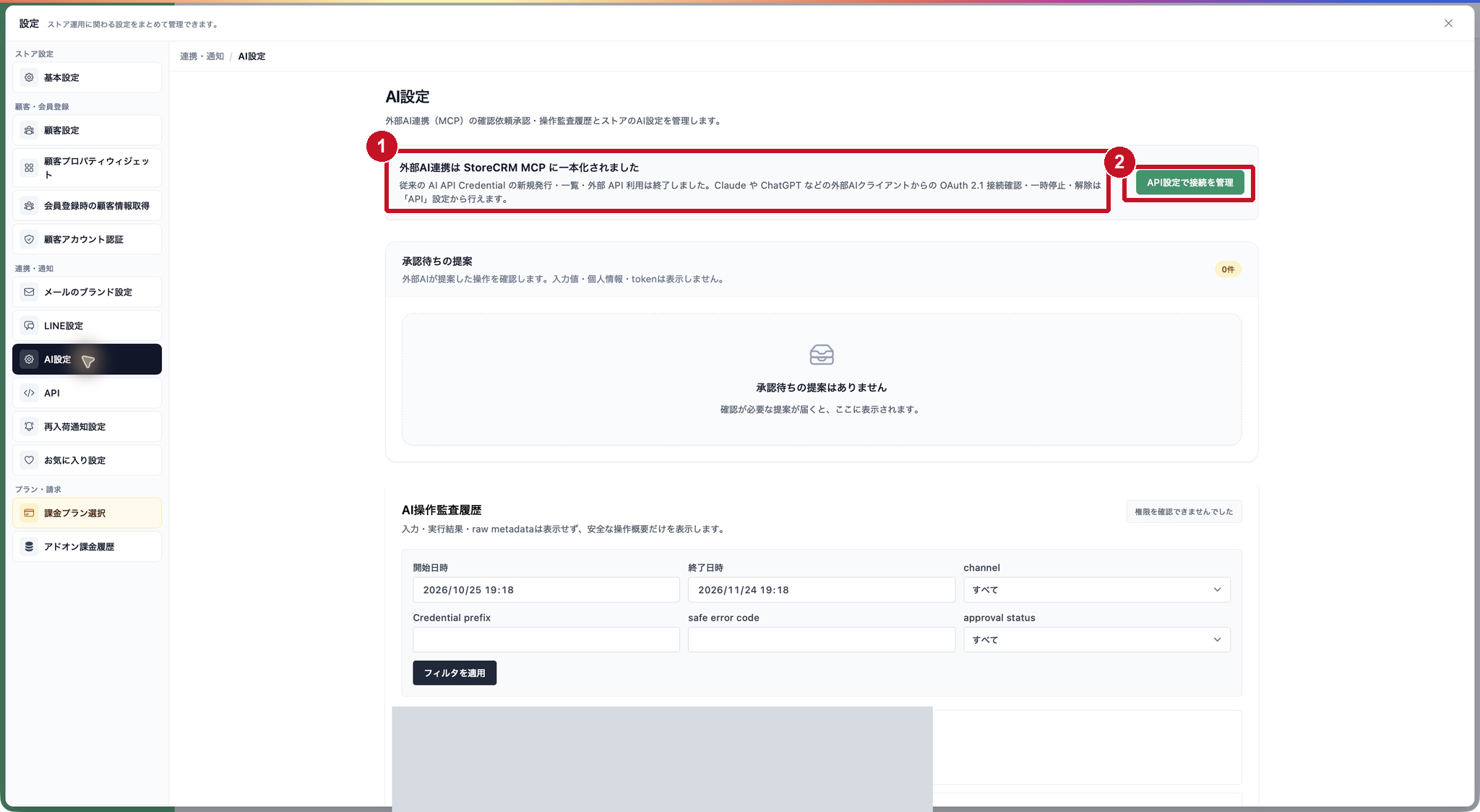
In StoreCRM, open [Settings] → [AI settings]. ① Review the external AI integration notice and ② select [Manage connections in API settings]. You can also go directly to [Settings] → [API].
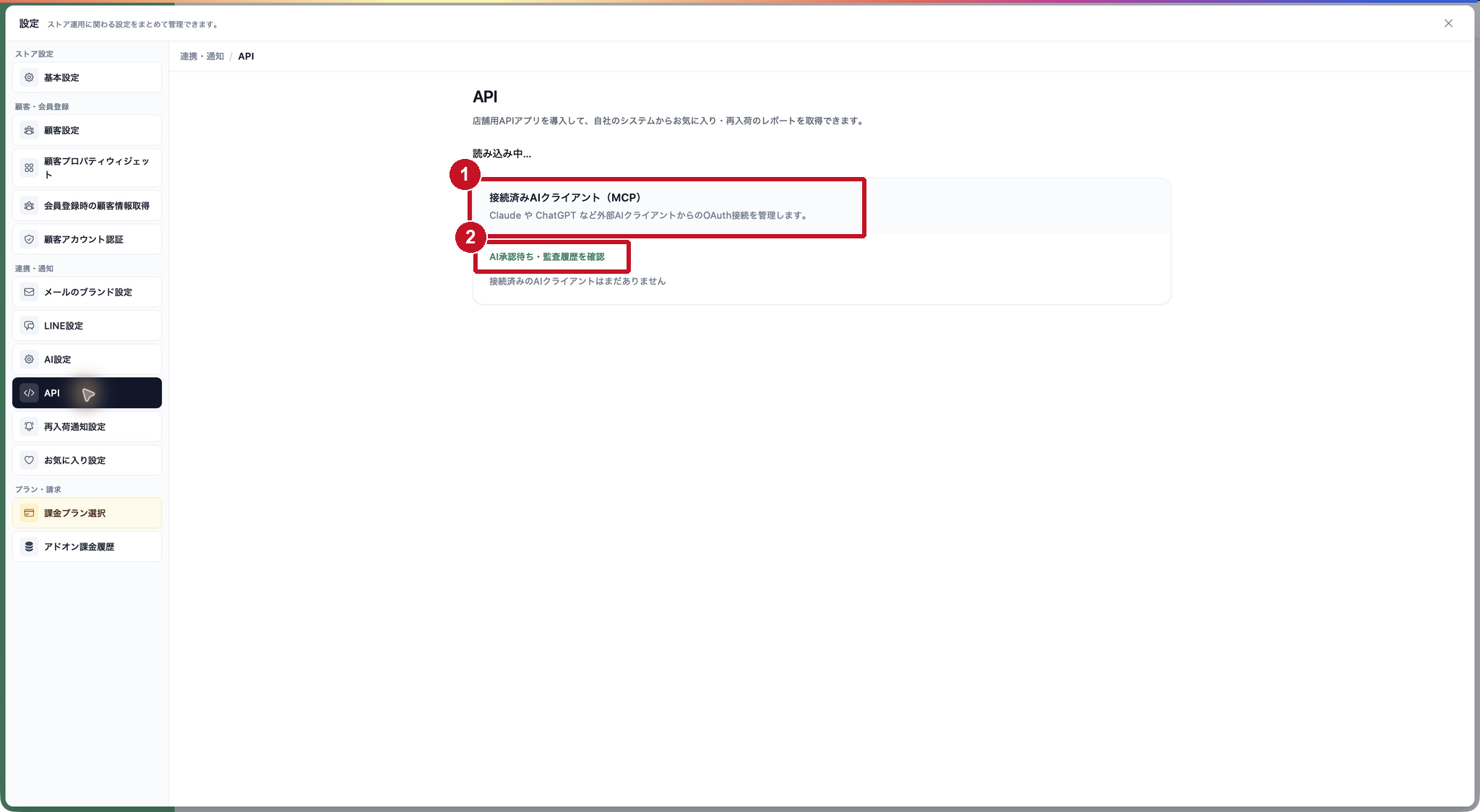
① In [Connected AI clients (MCP)], review the client, status, permissions, and expiration. Store owners can suspend, resume, or revoke a connection. To reconnect after revocation, authorize StoreCRM again from the AI client. ② Select [Check pending AI approvals and audit history] to see requests that require your review and view the history.
公開MCPツール一覧
接続したストアと許可したアクセス範囲に応じて、AIクライアントに表示されるツールが変わります。
対象リビジョン a51d56b64e425bfc2d8715168da5f7a33189803d(公開ツール 85 件)
| ツール名 | Purpose |
|---|---|
analytics__read_funnel_summary |
Read aggregate conversion funnel CVR, steps, journey paths, and weekly event trends without customer rows. |
analytics__read_highlights |
Read prioritized CRM analytics highlights ranked by aggregate change without customer rows. |
analytics__read_ltv_summary |
Read aggregate LTV summary curves, F2/F3 conversion steps, purchase cycle, or cohort retention matrix without customer rows. |
analytics__read_overview_summary |
Read aggregate CRM overview KPIs, revenue trend, composition, top RFM groups, and initiative summaries without customer rows. |
analytics__read_product_insights |
Read bounded aggregate product performance metrics (revenue, order count, F2 rate, favorite/restock signals, score averages) without customer rows. |
analytics__read_product_relationships |
Read aggregate related products, co-purchase affinity, or next-purchase transitions for a product without customer rows. |
analytics__read_rfm_summary |
Read aggregate RFM group distribution, lifecycle stages, and 5×5 matrix cell counts without customer rows. |
analytics__read_score_distribution |
Read aggregate customer score histogram bins and low/mid/high band counts without customer rows. |
analytics__read_segment_performance |
Read bounded daily performance metrics for a tenant-owned customer segment without returning member rows. |
automate__list_execution_failures |
List recent failed/stopped/skipped scenario executions using allowlisted safe error types (ExecutionErrorType or 'unknown'), failed node metadata, and irreversible HMAC masked customer identifiers. Raw last_error and log messages are strictly excluded. |
automate__preview_scenario_package_import |
Preview the contents, required resources, unresolved references, and excluded sensitive data of a shared scenario package code before human import in StoreCRM Web (no DB writes and share_code is never logged). |
automate__read_abandonment_evaluation |
Read PII-free aggregate evaluation counts, exclusion reasons, SLO metrics, and attribution effects for cart-add abandonment and browse abandonment scenarios. Degrades gracefully if analytics tables are unavailable or stale. |
automate__read_flow_structure |
Read the saved structure of one tenant-owned scenario (trigger, waits, branches, send steps with referenced asset names) by action id, without content bodies, customer data, or side effects. Use it to explain or review an existing scenario the operator is viewing. |
automate__read_scenario_performance |
Read aggregate performance metrics, LINE insights, and optional product sales for a tenant-owned scenario action without customer rows. |
automate__request_activation_review |
Request review in an authenticated StoreCRM Web session. This contract only creates a pending human review and never schedules, sends, cancels, resends, tests, activates, changes storefront settings, calls a provider, or dispatches a queue. |
automate__request_execution_pause_review |
Request review in an authenticated StoreCRM Web session. This contract only creates a pending human review and never schedules, sends, cancels, resends, tests, activates, changes storefront settings, calls a provider, or dispatches a queue. |
automate__request_execution_resume_review |
Request review in an authenticated StoreCRM Web session. This contract only creates a pending human review and never schedules, sends, cancels, resends, tests, activates, changes storefront settings, calls a provider, or dispatches a queue. |
automate__request_execution_retry_review |
Request review in an authenticated StoreCRM Web session. This contract only creates a pending human review and never schedules, sends, cancels, resends, tests, activates, changes storefront settings, calls a provider, or dispatches a queue. |
campaign__create_draft |
Create a new campaign draft or clone an existing campaign as a new draft without activation. With create_mode=new_draft pass flat top-level fields (name, send_all or customer_segment_id, email_id or message_line_id) and never source_campaign_id or overrides; the nested overrides object is only for create_mode=clone_as_draft. If this request created or updated an email or LINE draft, show its preview as the final tool call before replying. Use email__preview_content_draft or messaging__preview_content_draft. |
campaign__read_performance |
Read aggregate delivery metrics, click supplements, LINE insights, and optional product sales for a tenant-owned campaign without customer rows. |
campaign__request_schedule_review |
Request review in an authenticated StoreCRM Web session. This contract only creates a pending human review and never schedules, sends, cancels, resends, tests, activates, changes storefront settings, calls a provider, or dispatches a queue. |
campaign__request_send_review |
Request review in an authenticated StoreCRM Web session. This contract only creates a pending human review and never schedules, sends, cancels, resends, tests, activates, changes storefront settings, calls a provider, or dispatches a queue. |
campaign__update_draft |
Update only explicitly supplied fields on a same-lineage AI-created campaign draft. Audience and content remain exclusive, and no delivery or provider operation is performed. If this request created or updated an email or LINE draft, show its preview as the final tool call before replying. Use email__preview_content_draft or messaging__preview_content_draft. |
campaign_automation__create_rule_draft |
Create a StoreCRM campaign automation rule draft (status='draft', output_policy.state='draft') without activating triggers or dispatching jobs. Use campaign_automation.request_activation_review to activate. |
campaign_automation__list_rules |
List tenant campaign automation rules (triggers, target product scopes, audience policies, and output policies) with normalized legacy fields and cursor pagination. |
campaign_automation__read_runs_and_candidates |
Read campaign automation execution runs (safe error codes and output refs only) and optionally search selectable target candidates (products, custom collections, product tags, or manual run products). |
campaign_automation__request_activation_review |
Request review in an authenticated StoreCRM Web session. This contract only creates a pending human review and never schedules, sends, cancels, resends, tests, activates, changes storefront settings, calls a provider, or dispatches a queue. |
campaign_automation__update_rule_draft |
Edit a same-lineage campaign automation rule draft owned by the tenant without activating it or switching output_policy away from 'draft'. |
catalog__list_collections |
List tenant Shopify collections with handle, products count, Shopify Admin URL, optional sample products, and cursor pagination without exposing raw payloads. |
catalog__search_products |
Search tenant Shopify products and variants with handle, SKU, product_type, tag, status, Shopify Admin URLs, publication state, and cursor pagination using allowlisted fields only. |
catalog__simulate_recommendations |
Simulate product recommendations via StoreCRM's send-path resolver without Redis store cache pollution. Always degrades gracefully with quality='degraded' or 'unavailable' when Pixel API is unconfigured or unavailable. |
customer_profile__search_masked_summaries |
Search a purpose-limited tenant customer window with masked identifiers and contactability flags only. |
email__create_content_draft |
Create a new Email content draft or clone an existing email without activation or delivery. For new AI-authored emails, prefer content_spec: choose sale_coupon, new_arrival_product, seasonal_editorial, or lifecycle. new_arrival_product requires a product or collection section (scenario-selected when no fixed product is named); a general new-arrival announcement without one is seasonal_editorial. Include multiple bounded sections, one primary CTA, and optional EmailImageBrief metadata. Author the subject, preheader, headline, sections, CTA label, and draft name from the operator's intent instead of asking the operator to fill out those copy fields. Recipient selection is outside an Email content draft; do not require an audience or segment. Use email_content_spec.v2 for new drafts. A back-in-stock scenario email should include a scenario-selected product section without asking for a fixed product. A campaign-automation email may similarly use a scenario-selected collection section when requested. Scenario-selected resources use a store-home CTA. Ask only for missing business facts or the identity of a requested fixed product/collection. Never invent discounts, dates, coupon codes, product facts, image URLs, or depict a specific product in a generated-image brief. If the email delivers a scenario-generated coupon, set content_spec.include_coupon_block=true (optionally with coupon_auto_apply=true and/or primary_cta.destination='coupon') so StoreCRM emits the standard [coupon_code], [coupon_expires_date], and [coupon] placeholders. To embed a specific uploaded or existing image, first register or discover it via media.* tools and pass its media_id in content_spec.media_requests[].media_id (up to 6 images, placement hero or section with optional section_index, alt_text, href, and width_px). The result lists the saved image IDs and positions in embedded_images. Show the preview by default. If more tools are needed after saving this draft, call its preview tool again after the workflow finishes, before the final reply. |
email__create_draft_from_template |
Materialize an official or tenant-owned EmailTemplate with current tenant EmailBrand settings into a new Email saved with status='draft' and brand snapshot metadata (no sending or activation). Show the preview by default. If more tools are needed after saving this draft, call its preview tool again after the workflow finishes, before the final reply. |
email__list_templates_and_components |
Read visible email templates (official/store/scenario), template detail metadata, email brand settings, and reusable header/footer/other email components without DB side effects. Official template internal source markup remains hidden. |
email__preview_brand_reapply |
Preview reapplying the tenant's current EmailBrand settings to an email derived from an official template without modifying DB state. Returns eligibility, subject diff, plain text preview, and managed change summary. |
email__preview_content_draft |
Show a draft preview card in the current conversation. Call proactively after creation or updates, including after campaign and scenario setup, before the final reply. Returns the StoreCRM confirmation link if the card content is unavailable. |
email__read_content_summary |
Read one tenant-owned email's name, subject, status, and a bounded plain-text body excerpt by email id, without HTML, layout, customer data, or side effects. Use it to discuss or propose changes to an existing email the operator is viewing. |
email__read_performance |
Read aggregate delivery metrics and optional product sales for a tenant-owned Email without customer rows. |
email__update_content_draft |
Edit an existing Email content draft owned by the tenant. Supports metadata updates (name, subject), canonical EasyEmail data, full replacement via content_spec, or non-destructive image embedding via insert_images (pass media_id values from media.* tools to insert at top or bottom of the email body while preserving header/footer templates). The result lists the saved image IDs and positions in embedded_images. Draft status only; no activation, scheduling, deletion, or delivery. Show the preview by default. If more tools are needed after saving this draft, call its preview tool again after the workflow finishes, before the final reply. |
media__import_from_url |
Fetch a public HTTPS image URL (up to 10 MiB, png/jpeg/webp/gif, SSRF-checked with up to 3 redirects), store it into the tenant's StoreCRM media library (UserMedia), and return media_id and HTTPS url. |
media__list_assets |
List saved tenant image assets stored in StoreCRM media library (UserMedia). Returns media_id and, for CDN-hosted images, thumbnail_url for visual selection. Use media_id to embed an asset via email.create_content_draft or email.update_content_draft. The library does not store original file names. If the user describes an image, inspect thumbnails or the image URLs. Search only by ID or a known fragment of a stored path or URL. |
media__list_shopify_file_images |
List image files hosted in the connected Shopify store's Files library when Shopify read_files scope is granted. Returns HTTPS image URLs that can be imported with media.import_from_url. |
media__upload_image |
PREFERRED image upload tool for ChatGPT, Claude, and all chat clients (requires NO outbound HTTP from the client). Pass either: (1) image_file (OpenAI/ChatGPT file parameter — pass the user-attached or generated image file directly; up to 10 MiB, fetched securely by StoreCRM), OR (2) image_base64 + content_type (<= 2 MiB raw bytes). Supports png, jpeg, webp, and gif with magic-byte verification. Returns media_id and HTTPS url for embedding into email drafts. |
messaging__create_content_draft |
Create a new LINE message content draft or clone an existing message as a new draft without activation or delivery. Show the preview by default. If more tools are needed after saving this draft, call its preview tool again after the workflow finishes, before the final reply. |
messaging__create_richmenu_draft |
Create a StoreCRM LINE rich menu draft without calling the LINE API or activating publication. Follow up with messaging.request_richmenu_activation_review before activation. |
messaging__list_richmenus |
List tenant LINE rich menus, active delivery status computed from current window, delivery plan summaries, and tab area metadata without fetching S3 image bytes or raw errors. |
messaging__preview_content_draft |
Show a draft preview card in the current conversation. Call proactively after creation or updates, including after campaign and scenario setup, before the final reply. Returns the StoreCRM confirmation link if the card content is unavailable. |
messaging__read_content_summary |
Read one tenant-owned LINE message's name, status, and bounded display texts by message id, without raw JSON, customer data, or side effects. Use it to discuss or propose changes to an existing LINE message the operator is viewing. |
messaging__read_line_performance |
Read aggregate delivery metrics, LINE insights, and optional product sales for a tenant-owned LINE message without customer rows. |
messaging__request_richmenu_activation_review |
Request review in an authenticated StoreCRM Web session. This contract only creates a pending human review and never schedules, sends, cancels, resends, tests, activates, changes storefront settings, calls a provider, or dispatches a queue. |
messaging__update_content_draft |
Edit an existing LINE message content draft owned by the tenant. Draft status only; no activation, scheduling, deletion, or delivery. Show the preview by default. If more tools are needed after saving this draft, call its preview tool again after the workflow finishes, before the final reply. |
messaging__update_richmenu_draft |
Edit a same-lineage LINE rich menu draft owned by the tenant while keeping status='draft' and never calling the LINE Messaging API. |
operations__read_sync_and_import_status |
Read tenant Shopify sync statuses (via sync_status_views), recent Shopify bulk operations, CSV upload histories, and pending CSV import preparation metadata without exposing raw errors, S3 paths, GraphQL queries, or CSV sample rows. |
orders__read_summary |
Read PII-free aggregate Shopify order metrics grouped strictly by currency together with financial/fulfillment status counts, refund/cancellation counts, and order sync freshness. |
orders__search_summaries |
Search bounded tenant Shopify order summaries within a date range with currency, refund/cancel state, discount codes, line item summaries, Shopify Admin URLs, and masked customer identifier (enriched according to connection pii_level). |
referral__create_campaign_draft |
Create a new referral campaign draft (status='draft') or clone an existing referral campaign as a draft without publishing it. Use referral.request_publish_review for human publication approval. |
referral__list_campaigns |
List tenant referral campaigns together with the referral add-on entitlement status (active, grace, or none). Read-only and safe even when the add-on is not subscribed. |
referral__read_performance |
Read aggregate PII-free referral invitation, conversion, attribution source, reward status, and per-currency order revenue summaries without raw customer or error payloads. |
referral__request_pause_review |
Request review in an authenticated StoreCRM Web session. This contract only creates a pending human review and never schedules, sends, cancels, resends, tests, activates, changes storefront settings, calls a provider, or dispatches a queue. |
referral__request_publish_review |
Request review in an authenticated StoreCRM Web session. This contract only creates a pending human review and never schedules, sends, cancels, resends, tests, activates, changes storefront settings, calls a provider, or dispatches a queue. |
referral__update_campaign_draft |
Update editable settings on a same-lineage referral campaign draft owned by the tenant without publishing or mutating live campaigns. |
report__read_automate_dashboard |
Read aggregate StoreCRM Automate dashboard reports (email and LINE revenue, delivery, open, and click metrics) without customer rows. |
resource__read_summary |
Read one tenant-owned resource summary by selected ID without returning content or customer data. |
resource__search_summaries |
Search tenant-owned Email, Campaign, LINE message, scenario, segment, or collection summaries without returning content or customer data. A single match provides the selected resource ID. Omit updated_from/updated_to to search all items regardless of age; explicit windows are capped at 366 days. |
restock__create_transfer_dry_run |
Create an idempotent dry-run preview (CustomerRestockTransferRun with status='previewed') from variant/SKU mappings or CSV text without executing stock notification transfers or dispatching jobs. |
restock__list_transfer_history |
Read restock transfer feature enablement, executed/previewed transfer run history, variant mappings, and allowlisted notification check/result summaries without operator IDs or customer identities. |
restock__preview_transfer_notification |
Preview aggregate eligible/excluded counts, confirmation_checksum, and scenario messages for a restock transfer run without sending notifications or exposing customer PII. |
scenario_flow__create_draft |
Create a new StoreCRM flow-mode scenario draft from a high-level recipe or clone an existing flow scenario as a new draft. The target adapter derives and validates automate_actions.is_flow=1 nodes/connectors and rejects missing contracts or templates without activation. If the recipe includes coupon_generate, ensure follow-up email/LINE templates reference the coupon (for Email, set content_spec.include_coupon_block=true, and optionally coupon_auto_apply=true / primary_cta.destination='coupon'), check output.warnings, and guide the user to verify with scenario_flow.run_test. If this request created or updated an email or LINE draft, show its preview as the final tool call before replying. Use email__preview_content_draft or messaging__preview_content_draft. |
scenario_flow__run_test |
Run a StoreCRM scenario flow test inside a rollback-isolated SAVEPOINT (same core runner as /actions/{id}/test). Defaults to dry-run trace verification with dummy coupon code (TEST-ONLY). Set send_test_email=true to actually deliver the rendered test email to the tenant's verified test_mode_email recipient (call settings.read_test_email_status / settings.manage_test_email_recipient if verification is required). When create_shopify_coupon=true, execution requires store owner approval first (returns status='pending_approval'; retry the exact same call after approval). Use create_shopify_coupon=false whenever dummy coupon code (TEST-ONLY) verification is sufficient. |
scenario_flow__update_draft |
Edit an existing StoreCRM scenario owned by the tenant. In the Web assistant, standard-format scenarios support an UNSAVED proposal for name and interval options only: read automate.read_flow_structure first, use standard_settings interval keys in options with {term, count}, and never provide nodes/connectors or change classname. Other fields remain intact. For flow-mode scenarios, when nodes/connectors are provided they REPLACE the whole flow, so list EVERY node including the trigger (read the current graph via automate.read_flow_structure first) and every connector. Existing nodes may be passed as just {id: <node_id>} plus the changed fields (e.g. options with only the changed keys); unspecified fields and option keys are kept from the current node. New nodes need full fields (id: a unique temporary node ID used in connectors, automate_node_type_slug, name, options). The model must use the conversation semantic edit contract and must never author physical node slugs, node IDs, connector IDs, database IDs, or raw option keys. The server-owned authoring catalog and semantic compiler map wait intervals, wait-until, filters, branches, email/LINE sends, sending windows, coupon generation/checks, and browse-abandonment stages to the normal FlowEditor persistence contract. Raw nodes/connectors in this internal tool input are compiler output only. Omitting connectors keeps the current wiring and treats nodes as patches to existing nodes only (unmentioned nodes are kept; to change only one node's options, send just that node). Adding or removing nodes requires the full nodes+connectors graph. name/options/conditions may be patched without nodes. Active scenarios are never edited in place; activation, deletion, scheduling, and bulk operations are outside this draft-only contract. If this request created or updated an email or LINE draft, show its preview as the final tool call before replying. Use email__preview_content_draft or messaging__preview_content_draft. |
scenario_flow__validate_draft |
Run StoreCRM scenario ActionValidator/check_action validation for a flow-mode scenario draft without saving additional changes or activating delivery. |
segmentation__create_condition_draft |
Create or clone a StoreCRM customer segment condition JSON draft after target-context validation without materializing customers or activating delivery. |
segmentation__create_draft_from_analytics |
Convert a CRM Analytics selection_id (excluding customer360 individual cohorts) or analytics predicates into a standard CustomerSegment condition draft without dispatching extraction jobs or exposing PII. |
segmentation__preview_target_count |
Preview a tenant segment target count through an explicitly selected bounded MySQL or BigQuery aggregate without returning customer rows or materializing membership. Pass segment_id for a saved segment (for example the current page resource) or conditions for an unsaved proposal. |
segmentation__update_condition_draft |
Update only an explicit name/conditions patch on a same-lineage AI-created local segment draft after canonical nested validation, without target materialization or recalculation. |
settings__manage_test_email_recipient |
Send a 6-digit verification code (action='request_code') or confirm it (action='confirm_code') for a test email recipient on unreviewed tenants before running scenario_flow.run_test with send_test_email=true. |
settings__read_delivery_diagnostics |
Read non-secret diagnostics for sending domain authentication, LINE messaging quota, storefront runtime app embed, and tracking domain. |
settings__read_onboarding_status |
Read read-only tenant onboarding progress, channel readiness, and next action guidance without mutating state or returning secrets. |
settings__read_plan_usage |
Read tenant plan, effective functional_level, active customer usage, subscribed production add-ons, annual billing contract and latest snapshot, LINE/mail overage billing status, and non-mutating upgrade alert evaluation. |
settings__read_test_email_status |
Check whether the tenant has a verified test email recipient address configured and whether 6-digit verification is required (unreviewed stores) before running scenario_flow.run_test with send_test_email=true. Returns only a masked email address. |
storefront__propose_customer_capture_settings |
Validate a patch for customer_properties_widget or customer_registration_capture settings and return diff, proposed_keys for storefront.request_settings_review, and authenticated_web_route without saving. |
storefront__read_customer_capture_settings |
Read normalized StoreCRM customer properties widget settings and customer registration capture settings directly from tenant settings without modifying state or calling Shopify APIs. |
storefront__read_settings |
Read redacted public Storefront settings from the bounded tenant cache without writes. |
storefront__request_settings_review |
Request review in an authenticated StoreCRM Web session. This contract only creates a pending human review and never schedules, sends, cancels, resends, tests, activates, changes storefront settings, calls a provider, or dispatches a queue. |
Related articles
For information about AI Assistant in StoreCRM Web, seeUse AI Assistant.
 English
 Japanese