

Automation conditions further narrow the customers for whom an automation starts.
For example, send only to customers who purchased a specific product, linked LINE, or did not click an email in the last 30 days.
If the conditions do not match, automation processing is skipped for that customer.
Product and customer IDs are the numbers in Shopify URLs.
Available conditions depend on the selected automation type.
Scenario
| Item | Description. |
|---|---|
| Automation run number | Which run number this is for the same customer |
| This scenario has been run with the same client in the past. | Whether it previously ran for the same customer |
| Time the same scenario was run with the same customer | Date and time of previous run |
Example: send only to customers whose previous run was at least three days ago.
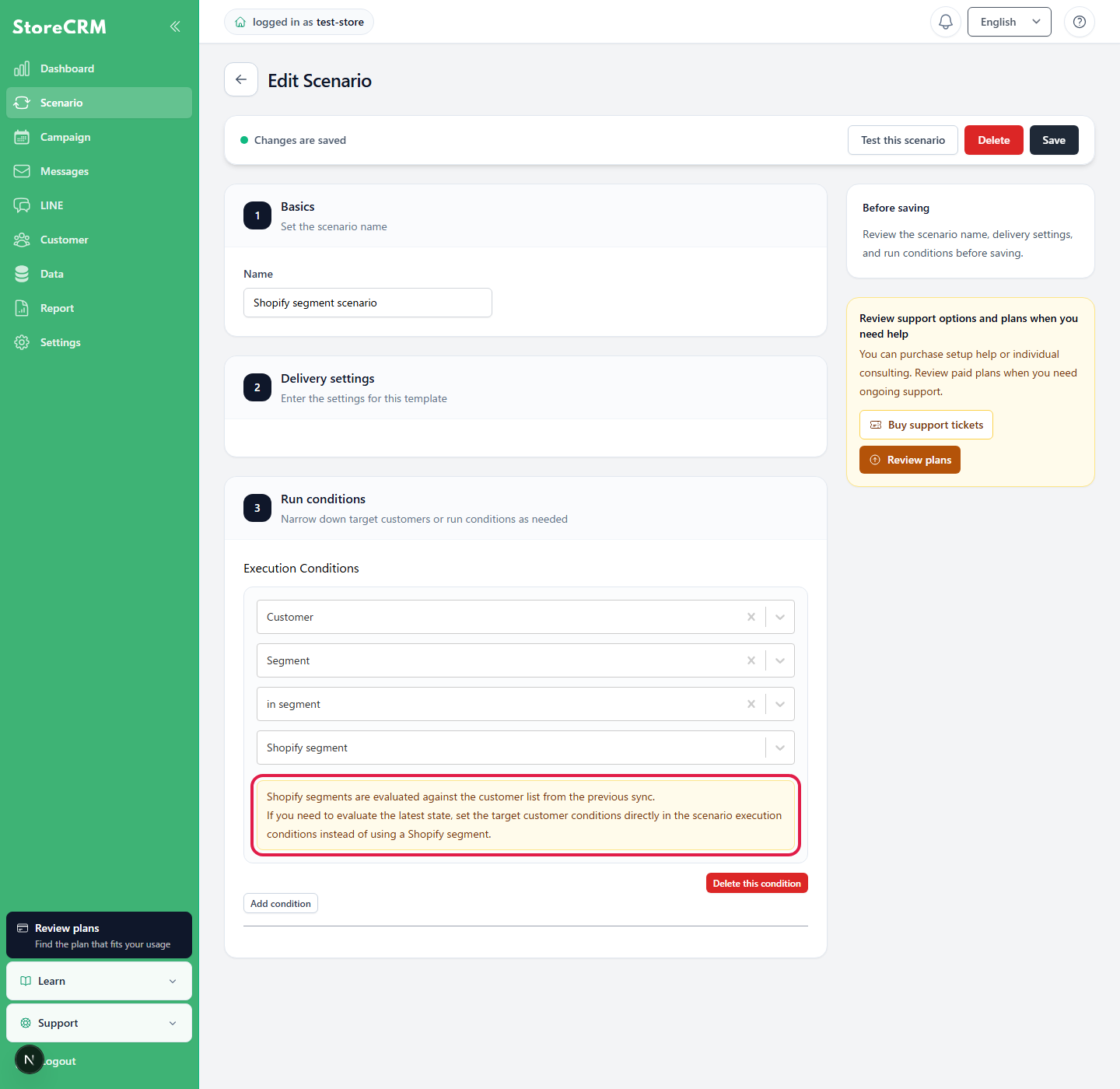
When using a Shopify segment as a condition
Shopify segment conditions use the customer list most recently synchronized to StoreCRM rather than querying Shopify live. Changes in Shopify are evaluated using the old list until synchronization completes.
For evaluation against current values, configure the equivalent automation conditions directly instead of selecting a Shopify segment. When using a Shopify segment, check its customer list update time before enabling the automation.
Customer
| Item | Description. |
|---|---|
| Email address | Customer email address |
| Birthday | Customer birthday |
| Name | Customer name |
| First name | Customer first name |
| Last name | Customer last name |
| Phone number | Customer phone number |
| Tags | Customer tags |
| Address | Customer address |
| Marketing Permits | Whether email marketing is permitted |
| transaction permission | Whether transactional email is permitted |
| ID | Shopify customer ID |
| Order count | Customer order count |
| Total Sales | Customer total amount spent |
| Last Order Date | Date and time of last order |
| Date and time of first order | Date and time of first order |
| With or without LINE linkage | Whether LINE is linked |
| Segments | Customers included or not included in a selected segment |
| Language | Customer language setting |
| Email has hard bounced | Customers suppressed because of an invalid address or another issue |
Orders
Available for automations triggered by an order.
| Item | Description. |
|---|---|
| Payment status | Order payment state |
| Fulfillment status | Order fulfillment state |
| Order number | Order number |
| Tags | Order tags |
| total price | Order total |
| Currency | Order currency |
| Total tax | Order tax |
| Order creation date and time | Date and time the order was created |
| Order update date and time | Date and time the order was updated |
| Order processing date and time | Date and time the order was processed |
| Order cancellation date and time | Date and time the order was canceled |
| Whether a subscription order is included | Whether the order contains subscription products |
| Is a single order included? | Whether the order contains one-time products |
| Product quantity (total quantity) | The sum of the quantities of all products in the order, not the number of product rows (for example, two units of product A and three units of product B equals five). |
Checkout
Available for checkout abandonment automations.
| Item | Description. |
|---|---|
| total price | Checkout total |
| Product quantity | Number of products in checkout |
| Number of available products | Number of products available after considering inventory |
Products and variants
Available for product-related automations such as orders, checkouts, back-in-stock notifications, and favorites.
| Item | Description. |
|---|---|
| Product name | Name of the product that triggered the automation |
| Product tag | Tag of the product that triggered the automation |
| Shopify product ID | Shopify product ID |
| Product variant name | Product variant name |
| Shopify variant ID | Shopify variant ID |
| Inventory | Number of product variations in stock |
Product and variant IDs are the numeric portions of Shopify admin URLs.
Purchase history
| Item | Description. |
|---|---|
| Customers who previously purchased the following products | Customers who previously purchased the selected products |
| Customers who previously purchased the following products as one-time purchases | Customers who purchased the selected products as one-time purchases |
| Customers who previously purchased the following products through recurring subscriptions | Customers who purchased the selected products through recurring subscriptions |
| Customers who have not previously purchased the following products | Customers who have not purchased the selected products |
| Customers who have not previously purchased the following products as one-time purchases | Customers who did not purchase the selected products as one-time purchases |
| Customers who have not previously purchased the following products through recurring subscriptions | Customers who did not purchase the selected products through recurring subscriptions |
| Customers purchasing the ordered product for the first time | Customers who have not previously purchased the selected products in this order |
| Customers purchasing the ordered product as a one-time purchase for the first time | Customers who have not previously purchased the selected products as one-time purchases |
| Customers purchasing the ordered product through a recurring subscription for the first time | Customers who have not previously purchased the selected products through recurring subscriptions |
Specify by product name, product tag, Shopify product ID, collection, product variant name, or Shopify variant ID.
Collection conditions support manual collections only.
Favorites and back-in-stock notifications
| Item | Description. |
|---|---|
| Customers who have favorited the following products | Customers who have favorited the selected products |
| Customers who have not favorited the following products | Customers who have not favorited the selected products |
| Customers who added a favorite in the last N days | Customers who added a favorite during the selected period |
| Customers who did not add a favorite in the last N days | Customers who did not add a favorite during the selected period |
| Customers subscribed to back-in-stock notifications for the following products | Customers subscribed to back-in-stock notifications for the selected products |
| Customers not subscribed to back-in-stock notifications for the following products | Customers not subscribed to back-in-stock notifications for the selected products |
| Customers who subscribed to a back-in-stock notification in the last N days | Customers who subscribed to a back-in-stock notification during the selected period |
| Customers who did not subscribe to a back-in-stock notification in the last N days | Customers who did not subscribe to a back-in-stock notification during the selected period |
| Registered via email | Customers who registered for a restock notification via email |
| Registered via LINE | Customers who registered for a restock notification via LINE |
Email / LINE engagement
| Item | Description. |
|---|---|
| Customers who opened an email in the last N days | Customers who opened an email during the selected period |
| Customers who did not open an email in the last N days | Customers who did not open an email during the selected period |
| Customers who clicked an email in the last N days | Customers who clicked a link in an email during the selected period |
| Customers who did not click an email in the last N days | Customers who did not click a link in an email during the selected period |
| Customers who opened or clicked an email in the last N days | Customers with an open or click engagement |
| Customers with no email opens or clicks in the last N days | Customers with no open or click engagement |
| Customers who clicked LINE in the last N days | Customers who clicked a link in a LINE message |
| Customers who did not click LINE in the last N days | Customers who did not click a link in a LINE message |
| Customers who engaged with email or LINE in the last N days | Customers who engaged with email or LINE |
| Customers with no email or LINE engagement in the last N days | Customers with no engagement on either email or LINE |
Select the scope from all sends, a campaign, an automation, an email, or a LINE message.
Open and click tracking can be delayed by up to approximately one hour.
Metafields and connected apps
When customer metafields are configured, "Metafield: XX" appears as a condition.
Fields from supported apps such as easyPoints can also be used. Available fields depend on store settings and integration status.
Logic
| Item | Description. |
|---|---|
| Go to YES by percentage (1–99%) | Split customers into YES and NO groups using the specified percentage. Use this for A/B tests. |
Split delivery and control groups by percentage
In execution conditions or a flow branch, select Logic (A/B test etc.) → Go to YES with a percentage and enter an integer from 1 to 99. Presets of 95, 90, 80, and 50 are available. The NO share is 100 minus the YES share. Zero, 100, and decimals are invalid.
Check both percentages and save. See Use the flow editor for branch connections and testing.
Difference from flow editor branches
Automation conditions are evaluated at the start. If they do not match, processing is skipped immediately.
Flow editor branches are evaluated during the automation, such as after a wait based on whether an email was opened or a product was purchased.
Notes
- Too many conditions can greatly reduce the audience.
- Email and LINE messages are not sent to customers who do not match.
- Before major condition changes in an active automation, check for unintended exclusions.
- Product, customer, and variant IDs are numeric portions of Shopify admin URLs.
- Engagement data such as email opens, email clicks, and LINE clicks can take time to appear.
Related pages
 English
  Japanese