Template tags available in email and LINE messages
Last updated:
In StoreCRM email and LINE messages, you can use template tags to insert customer names, order information, coupons, product information, delivery information, and more.
Template tags are replaced with the actual customer, order, or product information when the message is sent. If the applicable data is unavailable, the tag may appear as a blank value or its default value.
Enter template tags in the email body, email subject, LINE message body, or LINE Flex Message JSON.
Dear [customer_name], the tracking number for your order is [tracking_number].
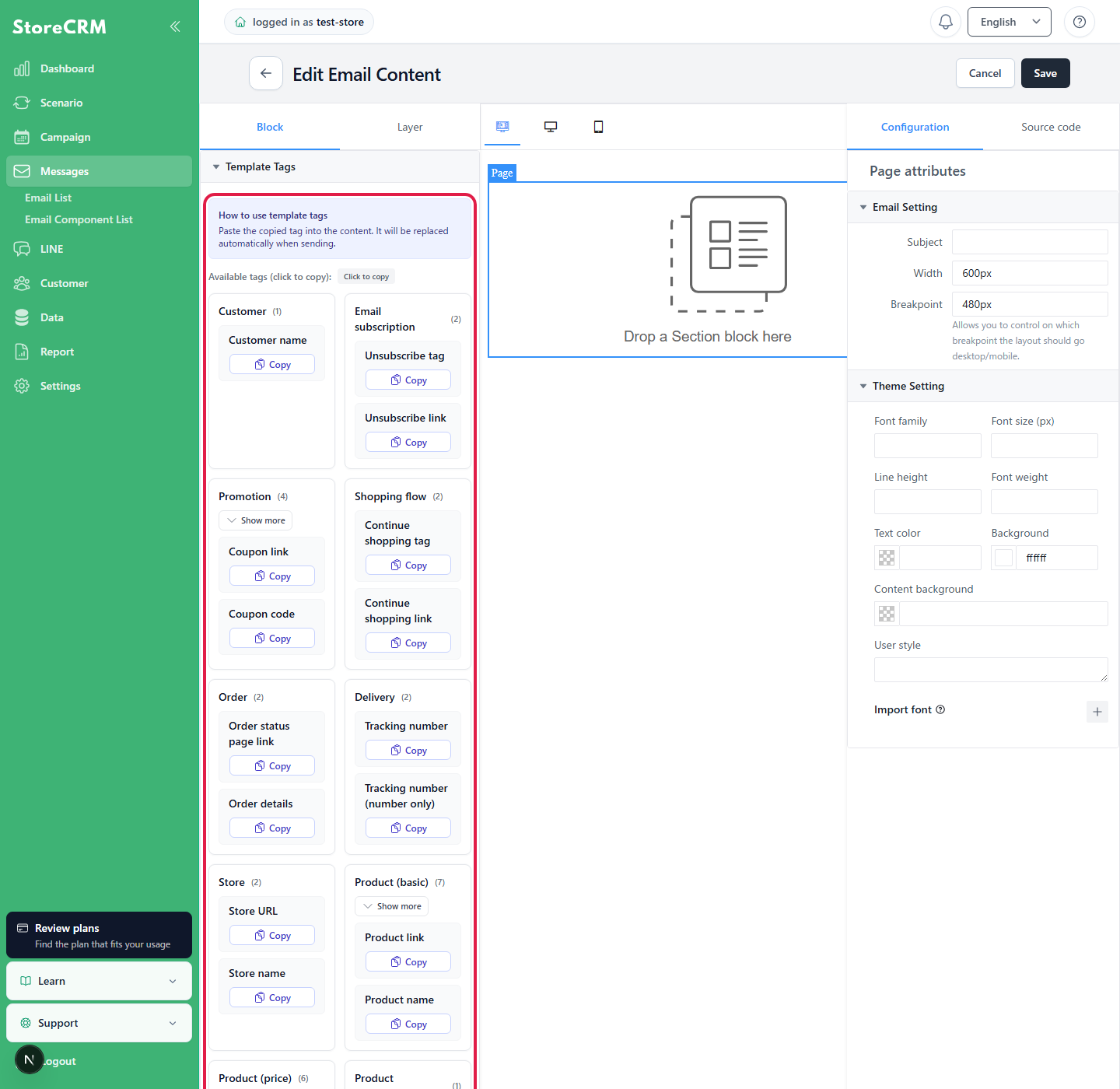
From the template tag list, you can copy the required tag and paste it into a message body or LINE Flex Message.
Use product, order, and coupon tags in automations or messages that have an applicable product, order, or coupon. The value may be blank in messages that do not have the required data.
Customer
Tags
Description
Description and primary use
[customer_name]
Customer name
Displays the customer's name.
Email subscription
Tags
Description
Description and primary use
[unsubscribe]
Unsubscribe tag
Displays an unsubscribe text link. This is mainly used in email bodies.
[unsubscribe_link]
Unsubscribe link
Displays only the unsubscribe URL. Use this in a URL field for a link button or similar element.
Promotion
Tags
Description
Description and primary use
[coupon]
Coupon link
Displays a link that applies the coupon. If no coupon is available, it falls back to the store URL.
[coupon_code]
Coupon code
Displays the coupon code.
[coupon_expires_at]
Coupon expiry (date and time)
Displays the coupon expiration date and time. Example: 2026-06-15 23:59
[coupon_expires_date]
Coupon expiry (date)
Displays only the coupon expiration date. Example: 2026-06-15
Shopping flow
Tags
Description
Description and primary use
[continue_shopping]
Continue shopping tag
Displays a text link for continuing shopping, such as after checkout abandonment.
[continue_shopping_link]
Continue shopping link
Displays only the checkout recovery URL or store URL. Use this in a URL field.
Orders
Tags
Description
Description and primary use
[order_status_link]
Order status page link
Displays the URL of the order status page.
[order_details]
Order details
Displays a summary of the order, including ordered items and prices.
Delivery
Tags
Description
Description and primary use
[tracking_number]
Tracking number
Tracking number: 55555555555 Displays the tracking number with a label, as shown above. Use this in message bodies.
[tracking_number_raw]
Tracking number (number only)
55555555555 Displays only the tracking number, as shown above. Use this in a tracking URL or LINE Flex Message URI.
When there are multiple tracking numbers,[tracking_number] displays them separated by a comma and a space, while[tracking_number_raw] displays them separated by commas.
Store
Tags
Description
Description and primary use
[store_url]
Store URL
Displays the store URL.
[store_name]
Store name
Displays the store name.
Product (basic)
Tags
Description
Description and primary use
[product_link]
Product link
Displays the URL of the product details page.
[product_name]
Product name
Displays the product name.
[variant_name]
Variant name
Displays the variant name.
[variant_options]
Variant options with names
Displays Shopify option names and selected values in their configured order. Example:Size: 1 / Color: Black
[product_variant_name]
Product variant name
Displays the product name and variant name together.
[product_image]
Product image
Displays the product image URL. If a variant image is available, the variant image takes precedence.
[variant_image]
Variant image
Displays the variant image URL.
Product (price)
Tags
Description
Description and primary use
[productVariant.price]
Variant price (with currency)
Displays the variant price with the currency.
[productVariant.price:number]
Variant price (number only)
Displays only the numeric variant price.
[productVariant.compareAtPrice]
Variant compare-at price (with currency)
Displays the variant compare-at price with the currency.
[productVariant.compareAtPrice:number]
Variant compare-at price (number only)
Displays only the numeric variant compare-at price.
[productVariant.discountPrice]
Variant discount amount (with currency)
Displays the variant discount amount with the currency.
[productVariant.discountPrice:number]
Variant discount amount (number only)
Displays only the numeric variant discount amount.
Product (inventory)
Tags
Description
Description and primary use
[productVariant.inventoryQuantity]
Variant inventory quantity
Displays the variant inventory quantity.
Product (details)
Tags
Description
Description and primary use
[product.productType]
Product type
Displays the product type.
[product.vendor]
Product vendor
Displays the product vendor.
[product.tags]
Product tags
Displays the product tags.
[product.collection_titles]
Product collections
Displays the names of the collections that contain the product.
Product (price range)
Tags
Description
Description and primary use
[product.price]
Product price range (with currency)
Displays the product price range with the currency.
[product.compareAtPrice]
Product compare-at price range (with currency)
Displays the product compare-at price range with the currency.
[product.discountPrice]
Product discount amount range (with currency)
Displays the product discount amount range with the currency.
Metafield
Tags
Description
Description and primary use
[metafield:{namespace}:{key}]
Metafield
References customer, product, variant, and order metafields. Example: [metafield:custom:vip_level]
For metafield tags, replace{namespace} and {key} with the namespace and key of the metafield you want to reference.
When using order metafields
[metafield:{namespace}:{key}] supports order metafields in addition to customer, product, and variant metafields. Use order metafields in automations triggered by orders or in messages that contain order information.
The order metafield value may be blank in messages that do not have order information.
Metafield (easyPoints)
Tags
Description
Description and primary use
[metafield:easypoints:pointBalance]
Point balance
Displays the easyPoints balance.
[metafield:easypoints:pointValue]
Earned points
Displays the points earned this time.
[metafield:easypoints:expiresAt]
Point expiry
Displays the point expiration date and time.
[metafield:easypoints:type]
Point type
Displays the point type.
[metafield:easypoints:referenceId]
Point reference ID
Displays the reference ID associated with the points.
[metafield:easypoints:tier]
Point tier
Displays the point stage (tier).
When used in a tracking URL
To insert a tracking number into a tracking URL, use[tracking_number_raw] .
[tracking_number] is a display tag that includes a label. If used in a URL, it may not be handled as a valid URL.
When used in a LINE Flex Message
When inserting a tracking number, product link, or similar value into a LINE Flex Message URI, specify a tag that can be used as a URL. For a tracking number, use [tracking_number_raw]; for a product page, use [product_link]; and for the store home page, use [store_url] .
The following tags are also replaced for compatibility with older emails and templates. For new content, we recommend using the English tags in the list above.
Tags
Description
Description and primary use
[お客様の名前]
Same as [customer_name]
Displays the customer's name.
[購読解除リンク]
Same as [unsubscribe]
Displays an unsubscribe text link.
[購読解除タグ]
Same as [unsubscribe]
Displays an unsubscribe text link.
[coupon_detail]
Same as [coupon_code]
Displays the coupon code.
[注文を続けるリンク]
Same as [continue_shopping_link]
Displays only the checkout recovery URL or store URL.
[注文内容]
Same as [order_details]
Displays a summary of the order details.
[追跡番号]
Same as [tracking_number]
Displays the tracking number with a label.
[ストアURL]
Same as [store_url]
Displays the store URL.
[ストア名]
Same as [store_name]
Displays the store name.
[商品リンク]
Same as [product_link]
Displays the URL of the product details page.
[商品名]
Same as [product_name]
Displays the product name.
[バリエーション名]
Same as [variant_name]
Displays the variant name.
[商品バリエーション名]
Same as [product_variant_name]
Displays the product name and variant name.
[商品画像]
Same as [product_image]
Displays the product image URL.
[バリエーション画像]
Same as [variant_image]
Displays the variant image URL.
Troubleshooting sending issues
If a URI error occurs in a LINE Flex Message, check whether the URL contains a display tag such as [tracking_number] .
If a product tag is blank, check whether product and variant information is associated with the automation or message.
If a coupon tag is blank, check whether a coupon is configured for the automation.
If a metafield tag is blank, check that the namespace and key are correct and that a value is saved for the applicable customer, product, variant, or order.


 English
  Japanese