

StoreCRM's Advanced mode (Liquid) lets you edit the favorite list page structure, displayed product and variant information, and appearance.
This page explains the three input areas, values provided by StoreCRM, how to display more than 20 favorites, and customization examples you can copy.
Using Simple mode
This page focuses on Advanced mode (Liquid). To adjust the list without editing code, use Simple mode on the [List screen] tab. Turn on [Standard display: show filtering and sorting] to provide sorting controls for both product-level and variant-level favorites.
A storefront preview appears on the right side of the settings screen. Check placement and wording before saving. Continue to Advanced mode below to edit Liquid or CSS.
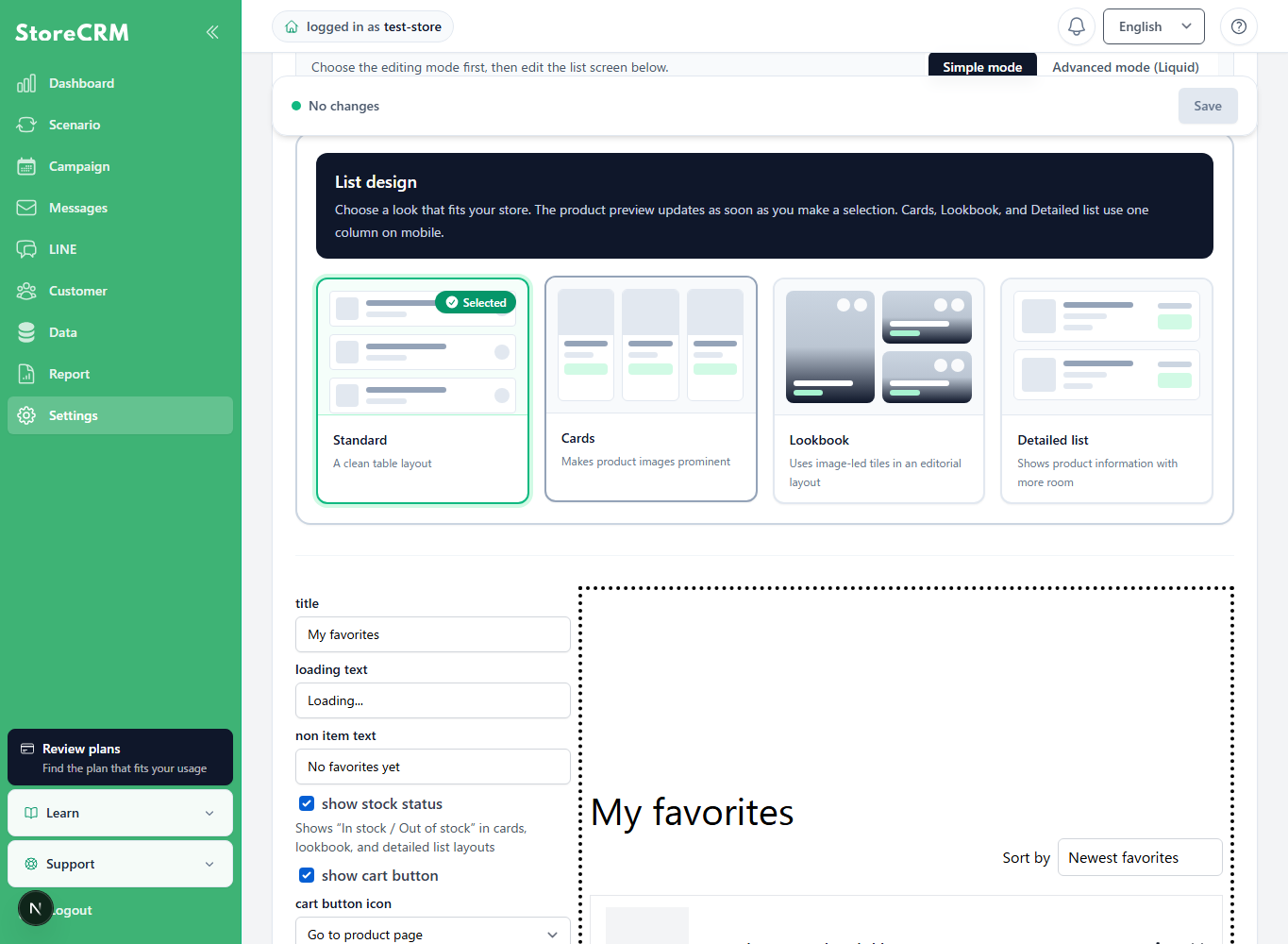
Open Advanced mode
In StoreCRM, open Settings → Favorite settings → Favorite list page, then select Advanced mode (Liquid).
Advanced mode can be edited only while the store's default language is selected.
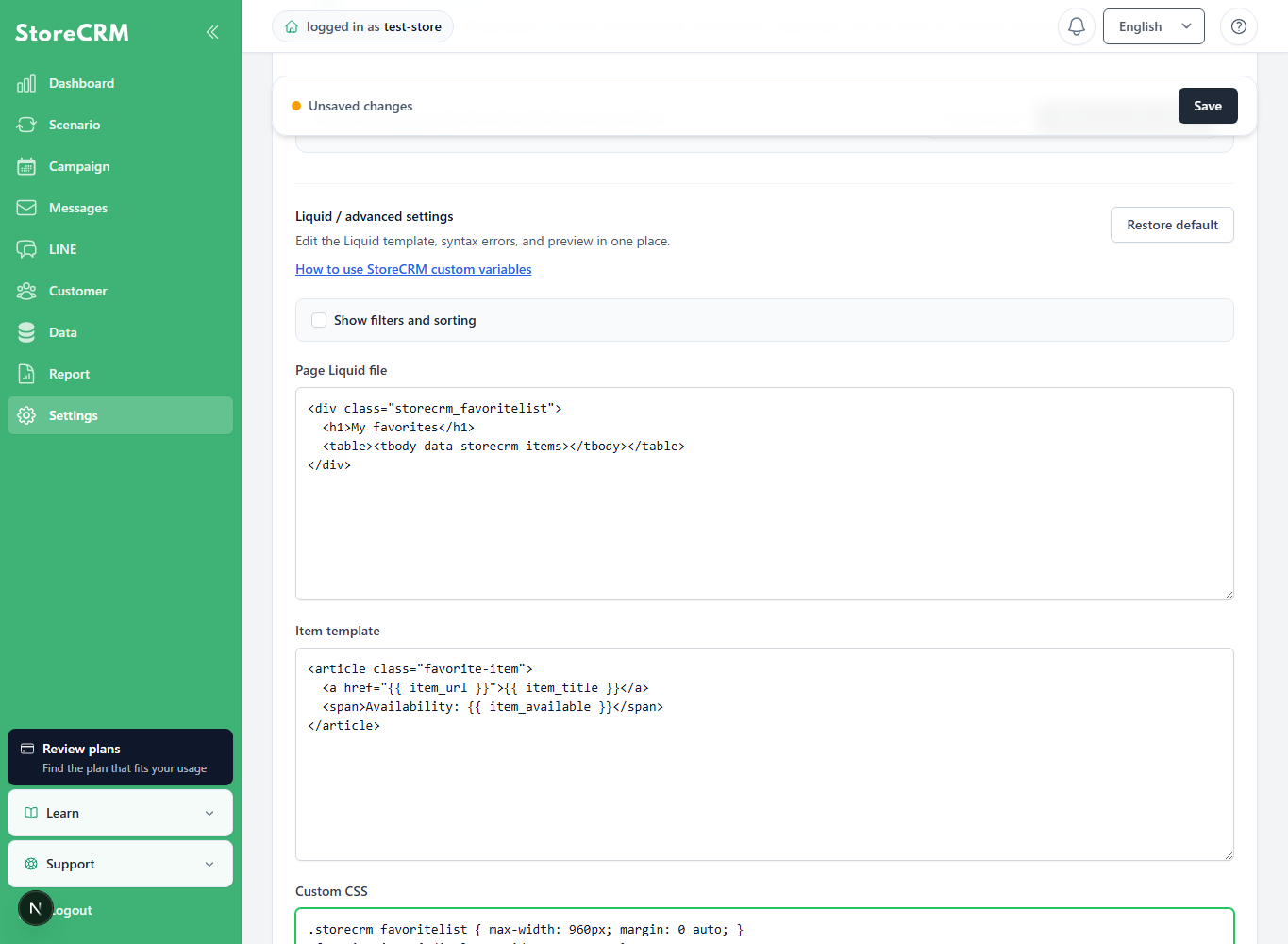
Roles of the three input areas
The screen contains Page Liquid file, Item template, and Custom CSS input areas.
| Input area | Role | Main editable content |
|---|---|---|
| Page Liquid file | Defines the overall favorite list page. | Edit the heading, empty-state message, item insertion point, and Load more button. |
| Item template | Defines each item displayed in the list. | Edit the product image, name, stock status, add-to-cart button, and remove-from-favorites button. |
| Custom CSS | Controls the appearance of the page and items. | Edit colors, spacing, font sizes, columns, and mobile layout. |
Separate item templates are saved for product-level and variant-level favorites.
The screen shows only the template for the currently selected favorite unit.
For Product favorites edit the product template; for Variant favorites edit the variant template.
Page Liquid file
This template wraps the entire page.
StoreCRM uses the following three elements for rendering. Do not remove them.
{{ custom_css }}: insertion point for custom CSS{{ favorite_items }}: insertion point for rendered item templatesdata-storecrm-items: attribute used by StoreCRM to identify the item area
{{ favorite_items }}On the element containingdata-storecrm-itemsalso add
Item template
Reference the array provided by StoreCRM using the sameindexand render each item.
Item templates are not repeated automatically, so the template requires the following loop.
{% if storecrm_item_count and storecrm_item_count > 0 %}
  {% for index in (0..storecrm_item_last_index) %}
    {% assign item_title = storecrm_item_titles[index] %}
    {{ item_title }}
  {% endfor %}
{% endif %}
Custom CSS
Style the page by targeting class names used in the Page Liquid file and item template.
<style>Enter CSS only without style tags.
Values passed from StoreCRM to Liquid
Advanced mode provides synchronized display values and values for controlling the list.
Synchronized display values
| Variable | Description |
|---|---|
storecrm_item_titles[index] | Product name. For variant-level favorites it can include the variant name. |
storecrm_item_urls[index] | Product page URL. For variant-level favorites it points to the selected variant. |
storecrm_item_thumbnail_urls[index] | Product image URL. |
storecrm_item_availables[index] | is used when available for purchase; otherwise'true'is used'false'It is. |
storecrm_item_product_ids[index] | Shopify product ID. |
Use StoreCRM synchronized values for product name, URL, image, and stock status.
Use the sameindexto correctly combine values for the same item.
{% assign item_title = storecrm_item_titles[index] | default: product.title %}
{% assign item_url = storecrm_item_urls[index] | default: product.url %}
{% assign item_thumbnail = storecrm_item_thumbnail_urls[index] %}
{% assign item_available = storecrm_item_availables[index] %}defaultThe expression to the right ofproduct.titleand ... andproduct.urlis a fallback when the synchronized value is empty.
StoreCRM synchronized values are normally used, so the fallback can be omitted.
Keep the fallback to preserve display immediately after synchronization or when some data is empty.
Values for list control and actions
| Variable | Description | Main use |
|---|---|---|
storecrm_favorite_total_count | Total number of favorites | Determines whether there are no favorites. |
storecrm_item_count | Number of items loaded this time | Determines whether the current page has items. |
storecrm_item_handles[index] | Product handle | Passes the product to the add-to-cart operation. |
storecrm_item_variant_ids[index] | Variant ID | Used for adding to cart and removing variant-level favorites. |
storecrm_item_last_index | Last index of the array loaded this time | 0Loop from the starting index through this value. |
storecrm_has_next_page | Whether another page exists | Determines whether the Load more button appears. |
storecrm_next_cursor | Cursor for retrieving the next page | Set this on the Load more button without modifying the value. |
mode | Favorite unit | productorvariantis determined. |
Display more than 20 favorites
Current Advanced mode can display more than 20 favorites while using StoreCRM synchronized values.
StoreCRM retrieves up to 20 items at a time and appends them to the same list.
Initial display and preview automatically load up to five pages or 100 items. The Load more button remains when more items exist.
{% if storecrm_has_next_page and storecrm_next_cursor != blank %}
  <button
    type="button"
    class="manual-favorites__more storecrm_customlist_load_more"
    data-storecrm-next-cursor="{{ storecrm_next_cursor }}"
    style="display:none;"
  >
    Load more
  </button>
{% endif %}storecrm_next_cursoridentifies the next data set. Do not split or transform it.
The legacy single-template format is limited to 20 items.
If using the legacy format, migrate to the current separate Page Liquid file, Item template, and Custom CSS format.
How to modify the default code
The default Advanced mode code works as a favorite list without modification.
You do not need to understand all of the code. Edit the relevant input area for the desired change.
- To change text, edit headings and button labels in the Page Liquid file or Item template.
- To change colors, spacing, or columns, edit Custom CSS.
- To reposition product images or names, edit the item template HTML.
Required parts of the Page Liquid file
StoreCRM uses the following three elements to display favorites.
{{ custom_css }}: loads the content entered in Custom CSS.{{ favorite_items }}: displays favorite products.data-storecrm-items: tells StoreCRM where to display products.
{{ favorite_items }}must bedata-storecrm-itemsplaced inside the element with the required attribute. Do not move these two parts separately.
The Load more section loads favorites after the first 20. Keep it to display more than 20 items.
Required parts of the item template
The default code combines product name, URL, image, and stock status from StoreCRM for each item. You can rearrange the surrounding HTML or add class names.
the add-to-cart button'sdata-cart-Keep attributes beginning with the required prefix and the remove button'sdata-product-id, ,data-variant-id. Removing them prevents buttons from identifying the target product.
Product-level and variant-level templates are saved separately. Review both when using both favorite units.
What you can change with custom CSS
Custom CSS controls columns, image size, text color, spacing, and mobile layout. Edit only CSS when product information and button behavior should remain unchanged.
Three favorite list design examples
For the three examples below, first use the shared Page Liquid and item template, then switch Custom CSS for each example.
Use StoreCRM synchronized values for name, URL, image, and stock status, with Shopify product information as a fallback for price and product type.
Store name, menu, currency, and search shown above each example come from the Shopify theme and are not included in the code.
Page Liquid shared by all three examples
Paste the following code into Page Liquid file.
{% assign list_title = 'Favorites' %}
{% assign list_title_suffix = '' %}
{% assign item_unit_text = 'items' %}
{% assign item_count_text = 'items' %}
{% assign empty_text = 'There are currently no favorite items.' %}
{% assign more_text = 'Load more' %}

{{ custom_css }}

<section class="manual-favorites">
  <header class="manual-favorites__header">
    <h1 class="manual-favorites__title">
      {{ list_title }}<span class="manual-favorites__title-suffix">{{ list_title_suffix }}</span>
    </h1>
    <p class="manual-favorites__count">
      <span>{{ storecrm_favorite_total_count }}</span>
      <span class="manual-favorites__unit manual-favorites__unit--items">{{ item_unit_text }}</span>
      <span class="manual-favorites__unit manual-favorites__unit--count">{{ item_count_text }}</span>
    </p>
  </header>

  <nav class="manual-favorites__breadcrumb" aria-label="Breadcrumb">
    <a href="/help/en/">Home</a>
    <span aria-hidden="true">/</span>
    <span>{{ list_title }}</span>
  </nav>

  {% if storecrm_favorite_total_count == 0 %}
    <p class="manual-favorites__empty">{{ empty_text }}</p>
  {% endif %}

  <div class="manual-favorites__items" data-storecrm-items>
    {{ favorite_items }}
  </div>

  {% if storecrm_has_next_page and storecrm_next_cursor != blank %}
    <button
      type="button"
      class="manual-favorites__more storecrm_customlist_load_more"
      data-storecrm-next-cursor="{{ storecrm_next_cursor }}"
      style="display:none;"
    >
      {{ more_text }}
    </button>
  {% endif %}
</section>
Item template shared by all three examples
Next paste the following code into Item template.
This code checksmodeto determine the favorite unit and works for both product-level and variant-level templates.
{% if storecrm_item_count and storecrm_item_count > 0 %}
  {% for index in (0..storecrm_item_last_index) %}
    {% assign item_handle = storecrm_item_handles[index] %}
    {% assign product = all_products[item_handle] %}
    {% assign product_id = storecrm_item_product_ids[index] %}
    {% assign variant_id = storecrm_item_variant_ids[index] %}
    {% assign item_title = storecrm_item_titles[index] | default: product.title %}
    {% assign item_url = storecrm_item_urls[index] | default: product.url | default: '#' %}
    {% assign item_thumbnail = storecrm_item_thumbnail_urls[index] %}
    {% assign item_available = storecrm_item_availables[index] %}
    {% assign item_category = product.type | default: product.vendor %}
    {% assign display_variant = product.selected_or_first_available_variant | default: product.variants.first %}

    {% if mode == 'variant' and variant_id != blank and product != blank %}
      {% for variant in product.variants %}
        {% assign candidate_id = variant.id | append: '' %}
        {% if candidate_id == variant_id %}
          {% assign display_variant = variant %}
          {% break %}
        {% endif %}
      {% endfor %}
    {% endif %}

    {% assign cart_variant_id = variant_id | default: display_variant.id %}
    {% assign row_id = product_id %}
    {% if mode == 'variant' and variant_id != blank %}
      {% assign row_id = variant_id %}
    {% endif %}

    <article class="manual-favorite-item storecrm_customlist_id-{{ row_id }}">
      <a class="manual-favorite-item__image" href="/help/en/{{ item_url }}/">
        {% if item_thumbnail != blank %}
          <img src="{{ item_thumbnail }}" alt="{{ item_title | escape }}" loading="lazy">
        {% endif %}
      </a>

      <div class="manual-favorite-item__body">
        {% if item_category != blank %}
          <p class="manual-favorite-item__category">{{ item_category }}</p>
        {% endif %}

        <h2 class="manual-favorite-item__name">
          <a href="/help/en/{{ item_url }}/">{{ item_title }}</a>
        </h2>

        {% if item_available == 'true' %}
          <p class="manual-favorite-item__status is-available">In stock</p>
        {% else %}
          <p class="manual-favorite-item__status is-unavailable">Out of stock</p>
        {% endif %}

        {% if display_variant != blank %}
          <p class="manual-favorite-item__price">
            <span class="manual-favorite-item__price-current">{{ display_variant.price | money }}</span>
            <span class="manual-favorite-item__price-tax">Tax included</span>
            {% if display_variant.compare_at_price and display_variant.compare_at_price > display_variant.price %}
              <span class="manual-favorite-item__price-before">{{ display_variant.compare_at_price | money }}</span>
            {% endif %}
          </p>
        {% endif %}

        <div class="manual-favorite-item__actions">
          {% if item_available == 'true' and cart_variant_id != blank %}
            <a
              class="manual-favorite-item__cart"
              href="/help/en/{{ item_url }}/"
              data-cart-variant-id="{{ cart_variant_id }}"
              data-cart-product-id="{{ product_id }}"
              data-cart-product-handle="{{ item_handle }}"
            >
              Add to cart
            </a>
          {% endif %}

          <a class="manual-favorite-item__view" href="/help/en/{{ item_url }}/">View product</a>

          <a
            class="manual-favorite-item__remove"
            href="/help/en/{{ item_url }}/"
            data-product-id="{{ product_id }}"
            {% if mode ="=" 'variant' and variant_id != "blank" %}
 data-variant-id="{{ variant_id }}"
            endif>
            <span class="manual-favorite-item__heart" aria-hidden="true">♥</span>
            <span class="manual-favorite-item__remove-label">Remove from favorites</span>
          </a>
        </div>
      </div>
    </article>
  {% endfor %}
{% endif %}
Simple card layout
Displays products as three-column cards with image, name, price, stock status, and cart button.
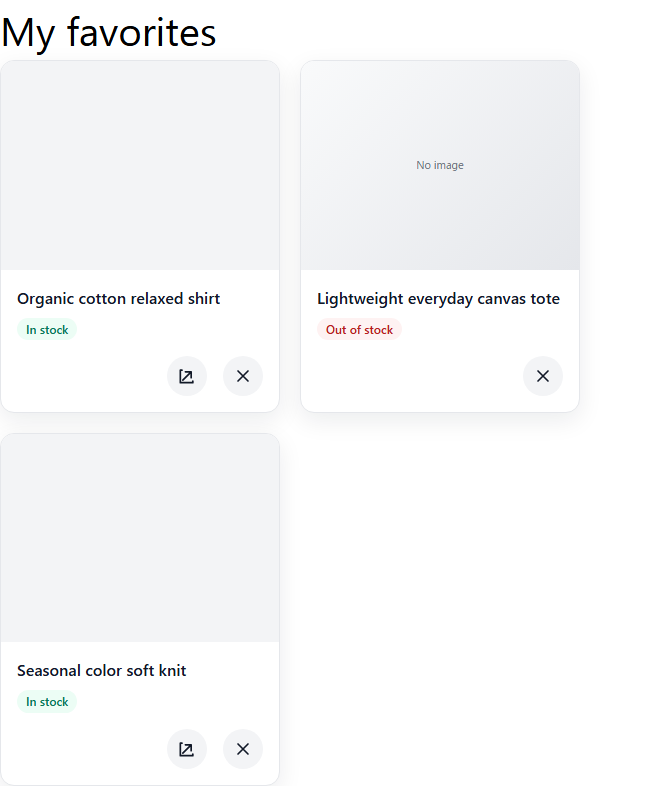
Paste the following code into Custom CSS.
.manual-favorites {
  max-width: 1200px;
  margin: 32px auto 80px;
  padding: 0 20px;
  color: #222;
}
.manual-favorites__header {
  display: flex;
  align-items: flex-end;
  gap: 12px;
  margin-bottom: 18px;
}
.manual-favorites__title {
  margin: 0;
  font-size: 32px;
}
.manual-favorites__title-suffix {
  display: none;
}
.manual-favorites__count {
  margin: 0 0 3px;
  font-size: 14px;
  font-weight: 700;
}
.manual-favorites__unit--count {
  display: none;
}
.manual-favorites__breadcrumb {
  display: flex;
  gap: 12px;
  margin-bottom: 28px;
  color: #777;
  font-size: 13px;
}
.manual-favorites__breadcrumb a {
  color: inherit;
  text-decoration: none;
}
.manual-favorites__items {
  display: grid;
  grid-template-columns: repeat(3, minmax(0, 1fr));
  gap: 24px 20px;
}
.manual-favorite-item {
  position: relative;
  border: 1px solid #ececec;
  background: #fff;
}
.manual-favorite-item__image {
  display: block;
  aspect-ratio: 1 / 1;
  overflow: hidden;
  background: #f6f6f6;
}
.manual-favorite-item__image img {
  width: 100%;
  height: 100%;
  object-fit: cover;
}
.manual-favorite-item__body {
  padding: 14px;
}
.manual-favorite-item__category {
  display: none;
}
.manual-favorite-item__name {
  margin: 0 0 12px;
  font-size: 16px;
}
.manual-favorite-item__name a {
  color: inherit;
  text-decoration: none;
}
.manual-favorite-item__status {
  display: inline-flex;
  margin: 0 0 12px;
  padding: 5px 8px;
  border: 1px solid #ddd;
  font-size: 12px;
}
.manual-favorite-item__status.is-unavailable {
  border-color: #e9b4b4;
  color: #b00020;
  background: #fff7f7;
}
.manual-favorite-item__price {
  display: flex;
  align-items: baseline;
  gap: 8px;
  margin: 0 0 14px;
}
.manual-favorite-item__price-current {
  font-size: 16px;
  font-weight: 700;
}
.manual-favorite-item__price-tax,
.manual-favorite-item__price-before {
  color: #777;
  font-size: 11px;
}
.manual-favorite-item__price-before {
  text-decoration: line-through;
}
.manual-favorite-item__actions {
  display: grid;
  gap: 10px;
}
.manual-favorite-item__cart {
  display: inline-flex;
  justify-content: center;
  align-items: center;
  min-height: 46px;
  padding: 10px 14px;
  border: 1px solid #111;
  color: #fff;
  background: #111;
  text-decoration: none;
}
.manual-favorite-item__view {
  display: none;
}
.manual-favorite-item__remove {
  position: absolute;
  top: 12px;
  right: 12px;
  color: #dc2f3b;
  text-decoration: none;
}
.manual-favorite-item__heart {
  font-size: 24px;
  line-height: 1;
}
.manual-favorite-item__remove-label {
  position: absolute;
  width: 1px;
  height: 1px;
  overflow: hidden;
  clip: rect(0 0 0 0);
}
.manual-favorites__more {
  display: flex;
  justify-content: center;
  min-width: 180px;
  margin: 32px auto 0;
  padding: 12px 20px;
}
@media (max-width: 749px) {
  .manual-favorites__items {
    grid-template-columns: repeat(2, minmax(0, 1fr));
    gap: 18px 10px;
  }
  .manual-favorite-item__body {
    padding: 10px;
  }
}
Simple list layout
Uses a smaller image with name, price, and action buttons in one row.
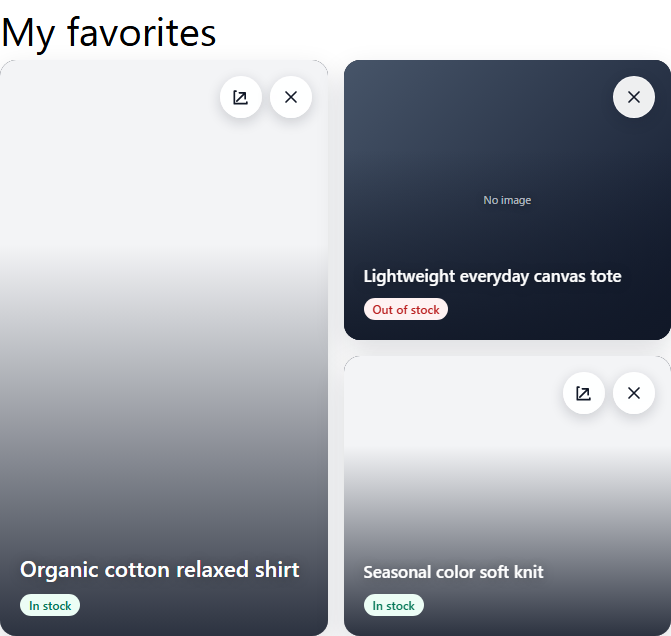
Paste the following code into Custom CSS.
.manual-favorites {
  max-width: 900px;
  margin: 32px auto 80px;
  padding: 0 20px;
  color: #222;
}
.manual-favorites__header {
  display: flex;
  align-items: flex-end;
  gap: 12px;
  margin-bottom: 18px;
}
.manual-favorites__title {
  margin: 0;
  font-size: 32px;
}
.manual-favorites__title-suffix {
  display: none;
}
.manual-favorites__count {
  margin: 0 0 3px;
  font-size: 14px;
  font-weight: 700;
}
.manual-favorites__unit--count {
  display: none;
}
.manual-favorites__breadcrumb {
  display: flex;
  gap: 12px;
  margin-bottom: 26px;
  color: #777;
  font-size: 13px;
}
.manual-favorites__breadcrumb a {
  color: inherit;
  text-decoration: none;
}
.manual-favorites__items {
  border-top: 1px solid #ddd;
}
.manual-favorite-item {
  position: relative;
  display: grid;
  grid-template-columns: 110px minmax(0, 1fr);
  gap: 24px;
  min-height: 165px;
  padding: 14px 0;
  border-bottom: 1px solid #ddd;
}
.manual-favorite-item__image {
  display: block;
  align-self: center;
  aspect-ratio: 1 / 1;
  overflow: hidden;
  background: #f5f5f5;
}
.manual-favorite-item__image img {
  width: 100%;
  height: 100%;
  object-fit: cover;
}
.manual-favorite-item__body {
  display: grid;
  grid-template-columns: minmax(0, 1fr) 150px;
  grid-template-rows: 1fr auto;
  column-gap: 24px;
}
.manual-favorite-item__category,
.manual-favorite-item__status {
  display: none;
}
.manual-favorite-item__name {
  grid-column: 1;
  grid-row: 1;
  margin: 0 0 8px;
  font-size: 15px;
}
.manual-favorite-item__name a {
  color: inherit;
  text-decoration: none;
}
.manual-favorite-item__price {
  grid-column: 1;
  grid-row: 2;
  display: flex;
  align-items: baseline;
  gap: 8px;
  margin: 0;
}
.manual-favorite-item__price-current {
  font-size: 15px;
  font-weight: 700;
}
.manual-favorite-item__price-tax,
.manual-favorite-item__price-before {
  color: #777;
  font-size: 11px;
}
.manual-favorite-item__price-before {
  text-decoration: line-through;
}
.manual-favorite-item__actions {
  grid-column: 2;
  grid-row: 1 / 3;
  align-self: end;
  display: flex;
  align-items: center;
  justify-content: flex-end;
}
.manual-favorite-item__cart {
  display: inline-flex;
  align-items: center;
  justify-content: center;
  min-height: 46px;
  padding: 10px 14px;
  border: 1px solid #111;
  color: #fff;
  background: #111;
  text-decoration: none;
}
.manual-favorite-item__view {
  display: none;
}
.manual-favorite-item__remove {
  position: absolute;
  top: 14px;
  right: 8px;
  color: #dc2f3b;
  text-decoration: none;
}
.manual-favorite-item__heart {
  font-size: 24px;
  line-height: 1;
}
.manual-favorite-item__remove-label {
  position: absolute;
  width: 1px;
  height: 1px;
  overflow: hidden;
  clip: rect(0 0 0 0);
}
.manual-favorites__more {
  display: flex;
  justify-content: center;
  min-width: 180px;
  margin: 32px auto 0;
  padding: 12px 20px;
}
@media (max-width: 749px) {
  .manual-favorite-item {
    grid-template-columns: 88px minmax(0, 1fr);
    gap: 12px;
  }
  .manual-favorite-item__image {
    grid-column: 1;
    grid-row: 1 / 3;
  }
  .manual-favorite-item__body {
    display: contents;
  }
  .manual-favorite-item__name {
    grid-column: 2;
    grid-row: 1;
  }
  .manual-favorite-item__price {
    grid-column: 2;
    grid-row: 2;
  }
  .manual-favorite-item__actions {
    grid-column: 1 / -1;
    grid-row: 3;
    justify-content: stretch;
    margin-top: 12px;
  }
  .manual-favorite-item__cart {
    width: 100%;
  }
}
Favorite list for a typical Japanese ecommerce site
Places product information in a bordered box with stock status, price, and three action buttons.
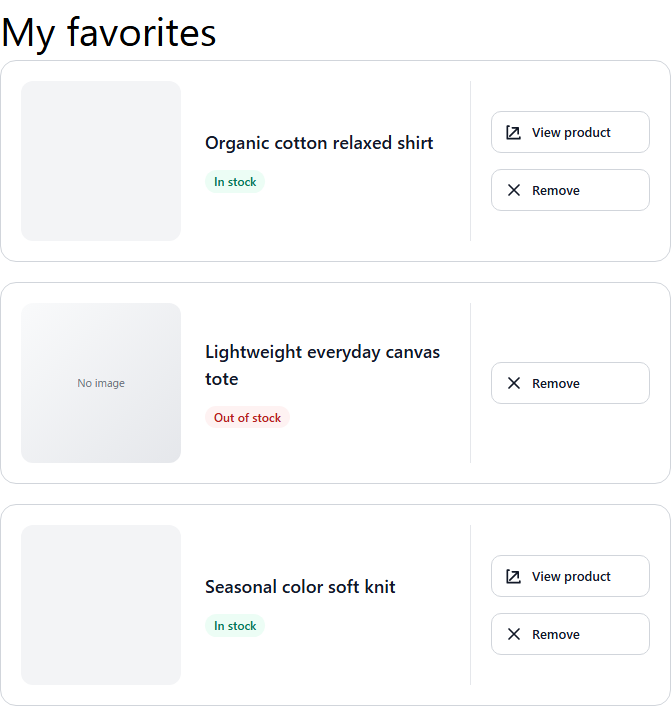
Remove all in the image was provided by legacy code.
Current Advanced mode does not support bulk removal, so it is not included below.
Paste the following code into Custom CSS.
.manual-favorites {
  max-width: 920px;
  margin: 32px auto 80px;
  padding: 0 20px;
  color: #2f2f2f;
}
.manual-favorites__header {
  display: flex;
  align-items: baseline;
  gap: 12px;
  margin-bottom: 14px;
  padding-bottom: 14px;
  border-bottom: 1px solid #ddd;
}
.manual-favorites__title {
  margin: 0;
  font-size: 24px;
}
.manual-favorites__count {
  margin: 0;
  font-size: 13px;
  font-weight: 700;
}
.manual-favorites__unit--items,
.manual-favorites__breadcrumb {
  display: none;
}
.manual-favorites__items {
  display: grid;
  gap: 12px;
}
.manual-favorite-item {
  display: grid;
  grid-template-columns: 120px minmax(0, 1fr);
  gap: 16px;
  padding: 14px;
  border: 1px solid #ddd;
  background: #fff;
}
.manual-favorite-item__image {
  display: block;
  align-self: center;
  aspect-ratio: 1 / 1;
  overflow: hidden;
  background: #f6f6f6;
}
.manual-favorite-item__image img {
  width: 100%;
  height: 100%;
  object-fit: cover;
}
.manual-favorite-item__body {
  display: grid;
  grid-template-columns: minmax(0, 1fr) 210px;
  grid-template-rows: repeat(4, auto);
  column-gap: 16px;
  align-content: center;
}
.manual-favorite-item__category {
  grid-column: 1;
  grid-row: 1;
  margin: 0 0 6px;
  color: #777;
  font-size: 12px;
  text-transform: uppercase;
}
.manual-favorite-item__name {
  grid-column: 1;
  grid-row: 2;
  margin: 0 0 8px;
  font-size: 16px;
  line-height: 1.6;
}
.manual-favorite-item__name a {
  color: inherit;
  text-decoration: none;
}
.manual-favorite-item__status {
  grid-column: 1;
  grid-row: 3;
  align-self: flex-start;
  justify-self: start;
  margin: 0 0 8px;
  padding: 5px 9px;
  border: 1px solid #ddd;
  color: #555;
  font-size: 12px;
}
.manual-favorite-item__status.is-unavailable {
  border-color: #e9b4b4;
  color: #b00020;
  background: #fff7f7;
}
.manual-favorite-item__price {
  grid-column: 1;
  grid-row: 4;
  display: flex;
  align-items: baseline;
  gap: 8px;
  margin: 0;
}
.manual-favorite-item__price-current {
  font-size: 19px;
  font-weight: 800;
}
.manual-favorite-item__price-tax,
.manual-favorite-item__price-before {
  color: #777;
  font-size: 11px;
}
.manual-favorite-item__price-before {
  text-decoration: line-through;
}
.manual-favorite-item__actions {
  grid-column: 2;
  grid-row: 1 / 5;
  align-self: center;
  display: grid;
  gap: 8px;
}
.manual-favorite-item__cart,
.manual-favorite-item__view,
.manual-favorite-item__remove {
  display: inline-flex;
  align-items: center;
  justify-content: center;
  min-height: 38px;
  padding: 8px 14px;
  text-decoration: none;
}
.manual-favorite-item__cart {
  border: 1px solid #111;
  color: #fff;
  background: #111;
}
.manual-favorite-item__view {
  border: 1px solid #333;
  color: #222;
  background: #fff;
}
.manual-favorite-item__remove {
  border: 1px solid #ddd;
  color: #777;
  background: #fff;
}
.manual-favorite-item__heart {
  display: none;
}
.manual-favorites__more {
  display: flex;
  justify-content: center;
  min-width: 180px;
  margin: 32px auto 0;
  padding: 12px 20px;
  border: 1px solid #2f2f2f;
  color: #2f2f2f;
  background: #fff;
}
@media (max-width: 749px) {
  .manual-favorite-item {
    grid-template-columns: 92px minmax(0, 1fr);
    gap: 12px;
    padding: 10px;
  }
  .manual-favorite-item__image {
    grid-column: 1;
    grid-row: 1 / 5;
  }
  .manual-favorite-item__body {
    display: contents;
  }
  .manual-favorite-item__category,
  .manual-favorite-item__name,
  .manual-favorite-item__status,
  .manual-favorite-item__price {
    grid-column: 2;
  }
  .manual-favorite-item__actions {
    grid-column: 1 / -1;
    grid-row: 5;
    margin-top: 10px;
  }
}
Preview, save, and restore defaults
Preview
Click Preview to check the current Liquid and CSS before saving.
Preview does not save changes. Click Save after confirming the result.
Preview supports up to 100 products. Also test the published page with zero, one, and more than 20 items.
Restore defaults
Restore defaults replaces the Page Liquid file, both product and variant item templates, and Custom CSS with default content.
This also resets the item template for the unit not currently shown.
Restoring defaults does not save automatically. Review the content and click Save.
To preserve customizations, copy the Page Liquid, both item templates, and CSS to a text file before restoring defaults.
Unsupported code and notes
- Script tags are not supported.
onclickInline event handlers on HTML elements are not supported.- URLs that execute scripts are not supported.
{{ custom_css }}, ,{{ favorite_items }}, ,data-storecrm-itemsmust not be removed.- Attributes used for removing favorites or adding to cart
data-must not be removed without checking their purpose.
Before major Liquid or CSS changes, save the original content and verify appearance and behavior in both preview and the actual store.
 English
  Japanese