
A wishlist lets customers save the products they are considering and come back to them later. Whether an item takes time to compare or a shopper is waiting for a price or stock change, they never have to hunt for it again.
With StoreCRM, everything is connected in a single app: the wishlist button on product pages, the wishlist page itself, per-customer and per-product management, reports, and email and LINE campaigns.
Turn purchase consideration into the next visit
Every product saved to a wishlist is a signal of what a customer is interested in. StoreCRM lets you act on that signal with automated campaigns triggered by wishlist sign-ups, price drops, restocks, or low stock, as well as one-off campaigns targeted at everyone who wishlisted a specific product. You reach customers at the moment they are most likely to resume their purchase decision, nudging them toward the next visit or order.
In fact, when we analyzed StoreCRM's delivery history, wishlist-triggered automated emails outperformed regular newsletters on every metric: open rate, click rate, conversion rate, and revenue per email.
| Metric | Wishlist-triggered automated emails | Regular newsletters | Difference |
|---|---|---|---|
| Open rate | 55.7% | 26.5% | About 2.1x |
| Click rate | 7.6% | 2.1% | About 3.6x |
| Conversion rate | 0.66% | 0.09% | About 7.3x |
Revenue per email was also about 5.8 times higher than regular newsletters.
Wishlist-triggered automation works because it tells customers who have already shown interest in a product about what happens to it next. Among individual templates, the "price dropped on a wishlisted product" email saw a 50.4% open rate, and the "wishlisted product is almost out of stock" email saw a 65.3% open rate.
* The analysis covers all deliveries sent through StoreCRM (excluding test sends): 36,277 wishlist-triggered automated emails and 19,642,098 regular newsletters. Wishlist-related automated emails were classified by delivery route and by keywords in the email name and subject line. Regular newsletters were classified as campaigns sent manually from the admin screen.
* Conversion rates and revenue are based on orders that StoreCRM attributed to each delivery (the attribution window follows the system's own logic).
* This comparison reflects observed results from StoreCRM's delivery history and does not demonstrate a causal effect of wishlist-triggered automation.
What StoreCRM's wishlist can do
Save from the product page
Add a wishlist button to your product pages. Customers save the items that catch their eye, then return from their wishlist to the product page to compare and buy.
You can let shoppers save at the product level or at the variant level, such as by color or size.
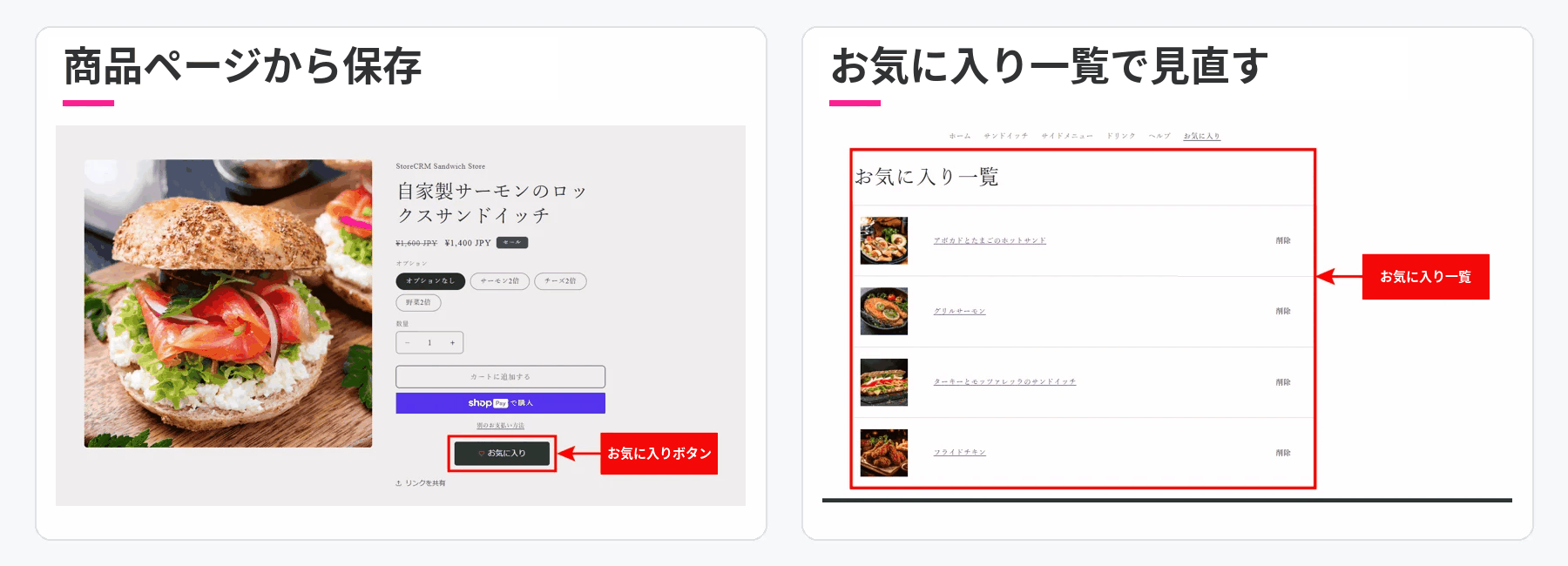
Click the image to enlarge.
Announce product changes by email and LINE
Trigger email and LINE messages from wishlist sign-ups and from price or stock changes on wishlisted products, reaching customers at moments when they are ready to reconsider a purchase.
- Reminders for identifiable customers who wishlisted a product but never bought it
- Price-drop and price-rise alerts for wishlisted products
- Back-in-stock notifications for wishlisted products
- Low-stock alerts for wishlisted products
With these scenarios in place, a wishlist is no longer just a place to park products; it turns interest into the next purchase opportunity. Sending requires the scenario to be enabled on an eligible plan, an identified customer, a delivery destination, delivery consent, and the relevant channel configured. Products saved as a guest are not eligible for the purchase reminder.
Track sign-ups in lists and reports, and use them in campaigns
The wishlist list in StoreCRM's admin screen shows each customer's current wishlist. The wishlist report shows, per product and variant, how many customers wishlisted an item during a period, how many currently have it wishlisted, and the first and most recent sign-up dates, with CSV export.
In campaign automations triggered by restocks or price changes, you can target email delivery at everyone who wishlisted the product. Beyond seeing which products draw attention, you can turn that interest into targeted campaigns.
Tailor it to your membership strategy and design
Choose whether guests can use the wishlist, or make it members-only and direct visitors to log in or sign up. You can also set where guests are sent when they tap the button.
Customize the wishlist button's label, color, and size, and choose from four display presets for the wishlist page.
- Standard view
- Card view
- Lookbook view
- Detailed list view
Combine product-level or variant-level saving, member and guest flows, and the wishlist page layout to match how your store operates.
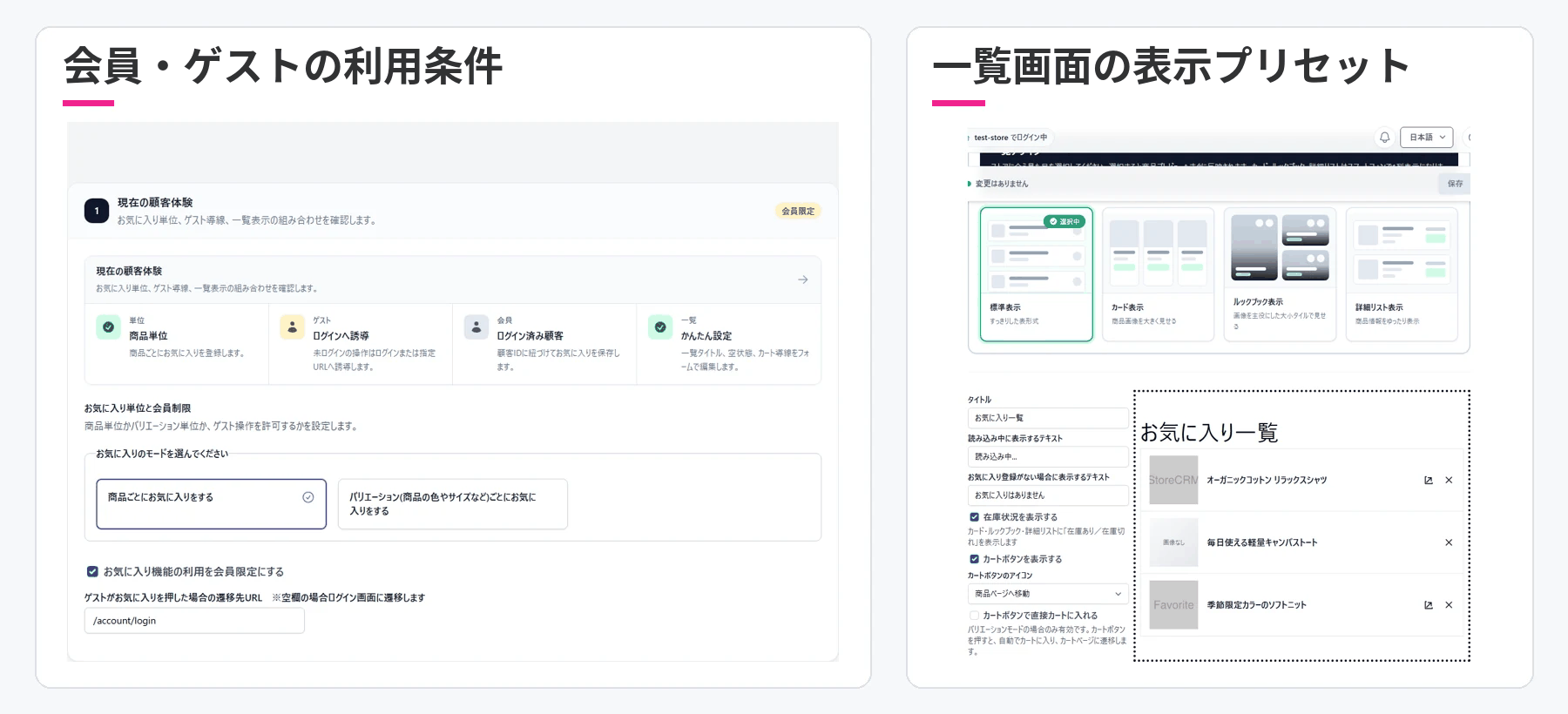
Click the image to enlarge.
From wishlist sign-up to CRM campaign
- Save a product: A customer taps the wishlist button on a product page.
- Review the list: They compare saved items on their wishlist and jump back to product pages.
- See what products and customers care about: In the admin screen, check current wishlists and sign-up counts by product and variant.
- Deliver the nudge to buy: Follow up with email and LINE campaigns triggered by forgotten purchases, price changes, restocks, or low stock.
Frequently asked questions
Do customers need an account to use the wishlist?
No. You can allow guests to use it or restrict it to members. If it is members-only, you can direct visitors to any URL you choose, such as the login page.
Can customers wishlist by color or size instead of by product?
Yes. You can choose between product-level and variant-level saving. Pick whichever fits your store's catalog and operations.
Can I switch between product-level and variant-level later?
You can change the setting, but data saved under the previous mode is excluded from display and reporting after the switch. Decide on the unit when you set up the feature, and contact us in advance if you need to migrate existing data.
Can changes to wishlisted products be announced automatically?
Yes. For identifiable customers, you can set up email and LINE delivery triggered by forgotten purchases after a wishlist sign-up, price drops and rises, restocks, and low stock. Sending requires the scenario to be enabled on an eligible plan, a delivery destination, delivery consent, and the relevant channel configured. Products saved as a guest are not eligible for the purchase reminder.
Can I see which products are drawing attention?
Yes. The wishlist report shows sign-ups during a period and current sign-ups per product and variant, along with first and most recent sign-up dates and CSV export.
A wishlist that does more than save products
From the saving experience to interest data to email and LINE campaigns timed to the moment of purchase: with StoreCRM's wishlist, your wishlist becomes the front door to your CRM.