LINE is a messaging app with more than 100 million monthly users in Japan (as of the end of December 2025, according to LY Corporation). More and more Shopify stores use a LINE official account as a channel customers notice more readily than email.
At the same time, we often hear from stores that opened a LINE official account but can't get their friend count to grow. This article introduces seven paths for growing LINE friends from a Shopify store, along with how to measure results and what to watch out for.
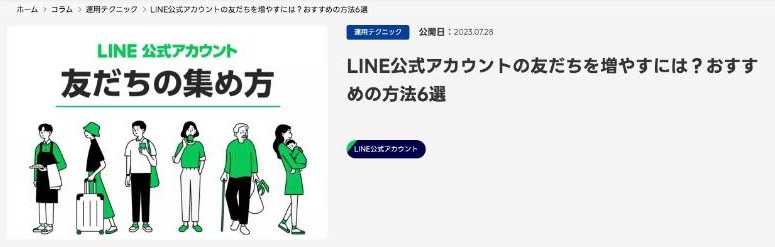
Source: LY Corporation for Business, "How to grow friends for your LINE official account" (viewed November 2, 2026)
LY Corporation's official column introduces many ways to gather friends, such as in-store posters, friend-add buttons, QR codes and friend-only rewards. This article focuses on the methods that are easiest to put into practice on a Shopify store's website.
First, the difference between "adding a friend" and "ID linking"
When using LINE with a Shopify store, it helps to think of it in two stages.
| Adding a friend | ID linking | |
|---|---|---|
| What happens | The customer adds your LINE official account as a friend | The customer's LINE account is connected with their Shopify customer record |
| What it enables | Broadcasts to all friends and segmented messages (using information in the LINE admin) | Individual messages based on Shopify data such as purchase history, wishlists and restock requests |
| Main paths | Friend-add buttons, QR codes, URLs | LINE Login, linking from the account page or thank-you page |
By getting customers all the way to ID linking, not just adding friends, you can send messages that tend to get a response, such as "a product on your wishlist dropped in price" or "the item you were waiting for is back in stock".
Seven paths for growing LINE friends from a Shopify store
1. Put a LINE linking banner across the site
The most basic path is a banner or button in your store's header, footer or sidebar, such as "Add us on LINE" or "Link LINE to get deals". It reaches customers on any page, so it is the first path to set up.
Spelling out the benefit, such as "Get new arrivals and restocks on LINE", tends to improve response. Many LINE integration apps let you add banners and icons like these without code.
2. Offer LINE Login for sign-up and login
Offering LINE Login for sign-up and login lets customers register without entering an email address or password. Besides reducing the effort of signing up, you can invite customers to add your account as a friend on the LINE Login consent screen (when LINE Login and your LINE official account are managed under the same provider).
Because ID linking is completed at the same time as login, this is the most efficient way to grow linked friends. To add LINE Login to Shopify, the usual approach is an app that supports it.
3. Take restock alert sign-ups on LINE from product pages
On out-of-stock product pages, offering "Get a LINE message when this is back in stock" lets customers who want that product sign up naturally. Because it reaches them when purchase intent is high, sign-up rates tend to be high.
LINE is noticed readily through push notifications, which makes it a good fit for restock alerts, where customers want to buy as soon as an item is back. Letting customers link LINE and sign up for the alert in one step from a button also reduces effort.
4. Invite ID linking on the thank-you page and account page after purchase
Customers who have just completed a purchase are at their most engaged with your store. Inviting them to link with "Get shipping updates on LINE" on the thank-you page or account page turns buyers into LINE friends.
5. Highlight the useful notifications they can get on LINE
Even without a coupon, the notifications themselves can be a reason to sign up. For example:
- Order and shipping confirmations
- Price-drop and low-stock alerts for wishlisted products
- Restock alerts
- Reminders about items left in the cart
Conveying the convenience of "you won't miss it on LINE" grows friends without feeling like a sales pitch.
6. Offer a reward for adding a friend
Giving a coupon as a thank-you for adding a friend is a standard approach also introduced in LY Corporation's official column. Attaching a coupon to the greeting message sent automatically when someone adds you can also lead to a purchase right after they add you.
However, customers who sign up only for the discount sometimes block you after receiving the reward. We recommend not relying on rewards alone and pairing them with a reason to receive messages, as in path 5.
7. Guide customers from outside the store too
Alongside on-site paths, guide customers from touchpoints outside the store.
- Print a friend-add QR code on flyers or cards included with orders
- Share your friend-add URL in your profile and posts on social media such as Instagram
- Let newsletter readers know they can also get updates on LINE
- If you have the budget, use LINE's friend-add ads (requires a verified account)
Measure which paths work
Once you add paths, check where new friends are coming from. LINE official accounts let you create URLs, QR codes and friend-add buttons that track the source, and you can check friend adds by source in the analytics menu of the admin.
Using a different URL or QR code for each path lets you compare, for example, "restock alerts are bringing in more friends than the banner", so you can focus on the paths that work best.
What to watch for when growing friends
Prevent blocks with message frequency and content
Even friends you worked hard to gain will block you if you send too many messages or content that isn't relevant to them. The best way to prevent blocks is to go beyond broadcasts and use ID-linked data to send content relevant to each person.
Know the LINE official account pricing
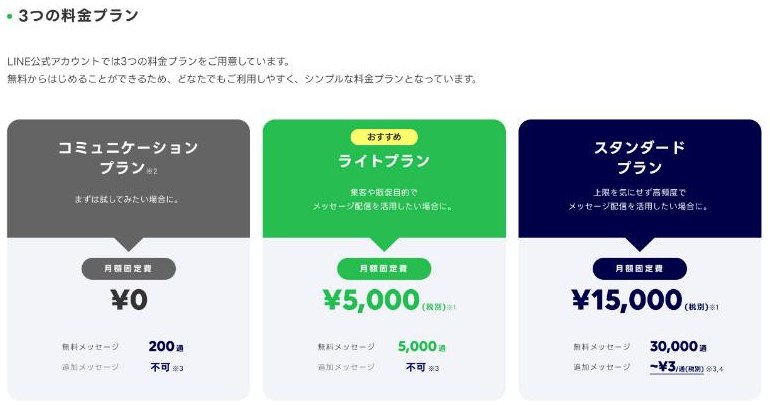
Source: LY Corporation for Business, "LINE official account pricing plans" (viewed November 2, 2026)
LINE official accounts have plans based on how many messages you can send each month.
| Plan | Per month (excl. tax) | Free messages | Additional messages |
|---|---|---|---|
| Communication plan | ¥0 | 200 | Not available |
| Light plan | ¥5,000 | 5,000 | Not available |
| Standard plan | ¥15,000 | 30,000 | ¥3 per message (¥2.5 above 200,000/month) |
Additional message prices reflect the revision effective October 1, 2026. As friends grow, so does your sending volume, so narrowing recipients with segmented messages also matters for cost. Check LY Corporation's official website for current pricing.
Check the guidelines
LINE official accounts have usage guidelines, and collecting friends or personal information improperly under the guise of a giveaway is treated as a violation. Check the latest guidelines before running something like a reward with conditions.
Summary
To grow LINE friends, place paths at the moments customers want to sign up for LINE: a site-wide banner, LINE Login, restock alerts and ID linking after purchase. Getting customers all the way to ID linking, not just adding a friend, lets you send messages tailored to their purchases and interests that tend to get a response. Measure each path by source and focus on the ones that work best.
To compare Shopify LINE integration apps, see also 4 Shopify LINE ID linking apps compared and What is CRM PLUS on LINE?.
StoreCRM puts these LINE linking paths in one place
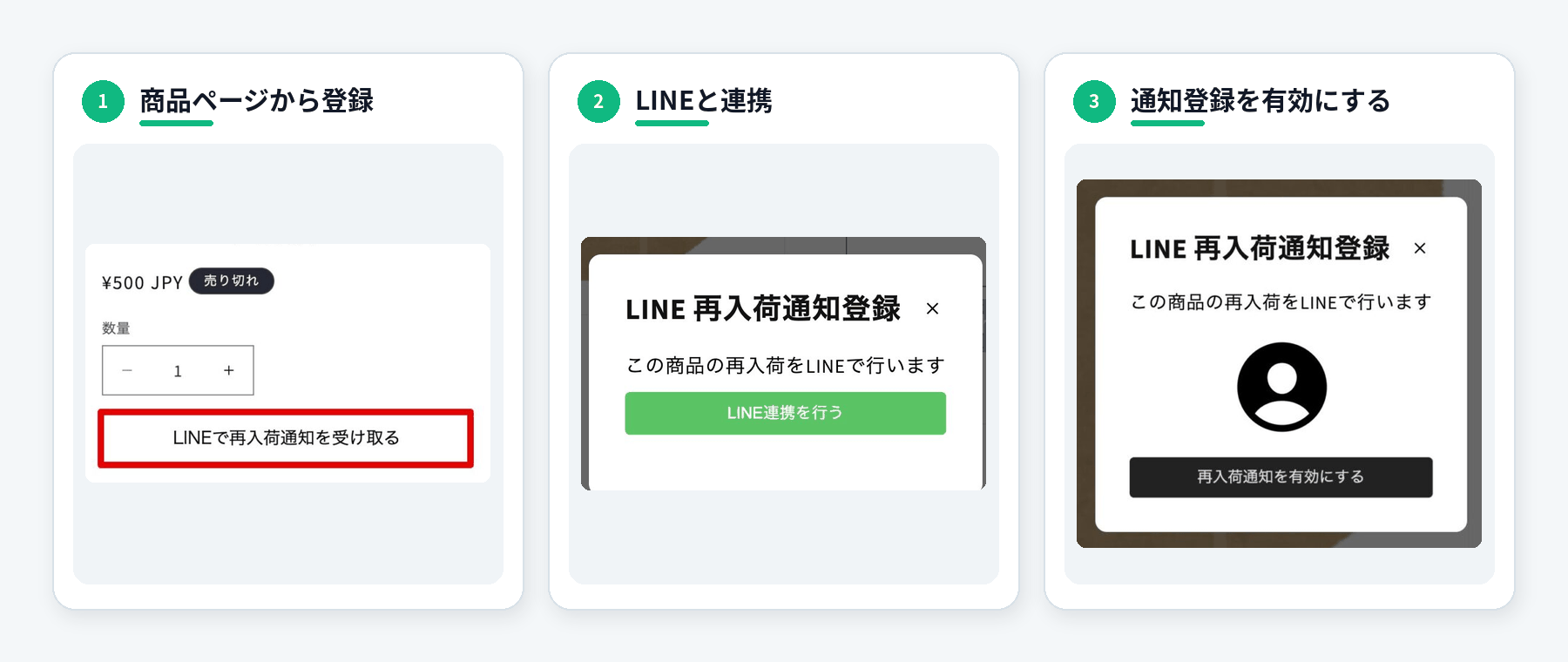
StoreCRM is a CRM and marketing automation app for Shopify stores in Japan. Of the paths in this article, it provides the LINE linking banner, LINE Login and LINE restock alerts in one app. To ID-linked customers, you can send LINE and email based on purchase history and wishlists from the same dashboard.
With one-step LINE restock alerts, customers link LINE from a button on the product page and sign up for the alert right there. In StoreCRM's sending data, LINE restock alerts had a 38.9% click rate, about 2.4 times that of email restock alerts (16.3%).
StoreCRM is free for up to 300 active customers, and paid plans come with a 30-day free trial. You can also download our product guide, which covers features and pricing.
References
- LINE surpasses 100 million monthly users in Japan (LY Corporation, January 29, 2026)
- Six ways to grow friends for your LINE official account (LY Corporation for Business)
- LINE official account pricing plans (LY Corporation for Business)
- Revision of additional message pricing (LY Corporation for Business)
- Tracking the source of friend adds (LY Corporation for Business)
- Add a LINE Official Account as a friend when logged in (LINE Developers)
Information in this article is current as of November 2026. LINE official account pricing and features may change.