
Add a signup path to your product pages so customers waiting for a sold-out item can get notified via LINE when it comes back in stock.
Customers tap a button on the product page, link their LINE account, and sign up for the back-in-stock alert in one flow — no store login required. For customers who are already logged in with a linked LINE ID, you can optionally enable one-click signup with a single button press.
When stock returns to your configured threshold, StoreCRM kicks off the back-in-stock scenario and notifies customers on LINE according to the wait times and delivery conditions you set. Signup collection, delivery, and subscriber tracking are all managed in StoreCRM.
LINE back-in-stock alerts get stronger responses than email
Across StoreCRM's delivery data, LINE back-in-stock notifications outperformed email back-in-stock notifications on both click rate and revenue per message.
| Metric | LINE back-in-stock alerts | Email back-in-stock alerts | Difference |
|---|---|---|---|
| Click rate | 38.9% | 16.3% | ~2.4x |
Revenue per message was also roughly 2.4 times that of email back-in-stock notifications.
LINE messages arrive as push notifications that are hard to miss — a great match for the "I want to buy it the moment it's back" mindset — so even a small number of deliveries tends to produce a strong response.
-
The aggregation period covers all deliveries in StoreCRM (excluding test deliveries): 9,403 LINE back-in-stock notifications and 419,295 email back-in-stock notifications. Messages were classified as back-in-stock notifications when their template name or subject line indicated a restock.
-
Because LINE does not support open tracking, this comparison uses click rate and revenue per message.
-
Revenue is based on orders that StoreCRM attributed to each delivery (the attribution window follows the system's own logic).
-
This comparison is an observation based on StoreCRM's delivery data and does not demonstrate a causal effect of LINE back-in-stock notifications.
Signup flows that adapt to each customer's LINE status
By linking their LINE account, customers can sign up for back-in-stock alerts even without logging in to your store. For customers who are logged in with a linked LINE ID, enabling one-click signup lets them register with a single button press.
Customers who haven't linked LINE yet are guided through the linking screen and can sign up once linking is complete. For logged-in customers, you can optionally have the selected product and variant registered automatically after linking.
Because this works as part of StoreCRM's back-in-stock feature, there's no need to add a separate back-in-stock app. You do need StoreCRM installed and an initial connection to your LINE Official Account.
What one-step LINE back-in-stock alerts can do
Add a LINE notification button to sold-out products
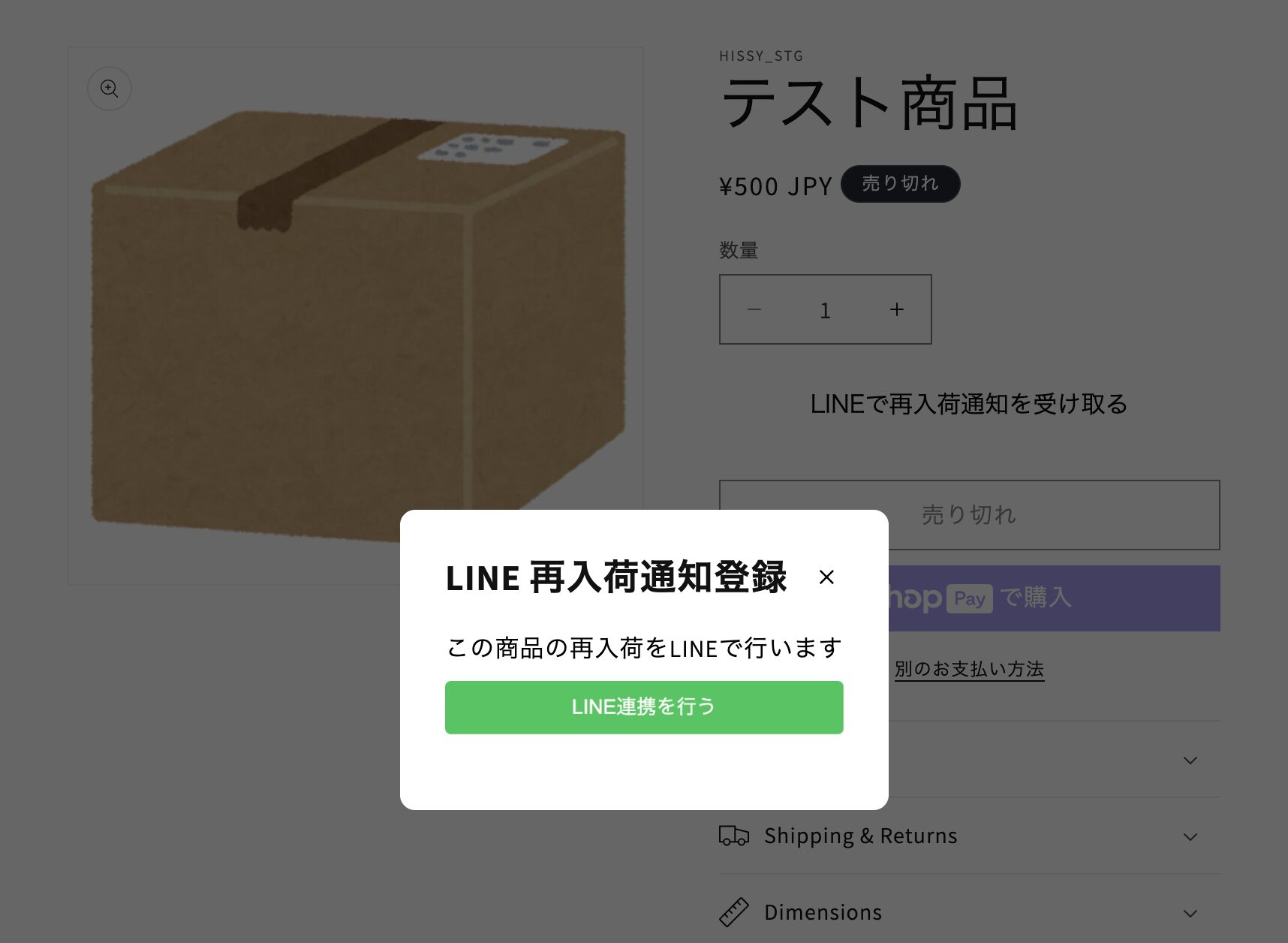
Add the app block to your product template to show a "Get back-in-stock alerts on LINE" button on sold-out product pages.
It works alongside the email back-in-stock button, so customers can choose how they want to be notified.
For standard back-in-stock notifications via email and LINE, see the back-in-stock notifications feature page.
Fewer steps for customers who are already set up
Customers who are logged in with a linked LINE ID can complete signup with a single button press, if you enable it. For products and variants they've already registered, the button can switch to a "signed up" state.
Customers who haven't linked LINE are guided through linking first. No email address is required to sign up for LINE notifications.
LINE delivery triggered by restocks
When the target product's stock returns to your configured threshold, StoreCRM starts the back-in-stock scenario. Delivery then follows the wait times and conditions defined in the scenario.
Notifications are triggered by restocks of the specific variant each customer selected at signup.
Track subscribers in the admin
Back-in-stock subscribers are visible in the StoreCRM admin. Email and LINE signups live in the same feature, so you can manage your restock audience in one place instead of across separate tools.
The signup flow for customers without a linked LINE account
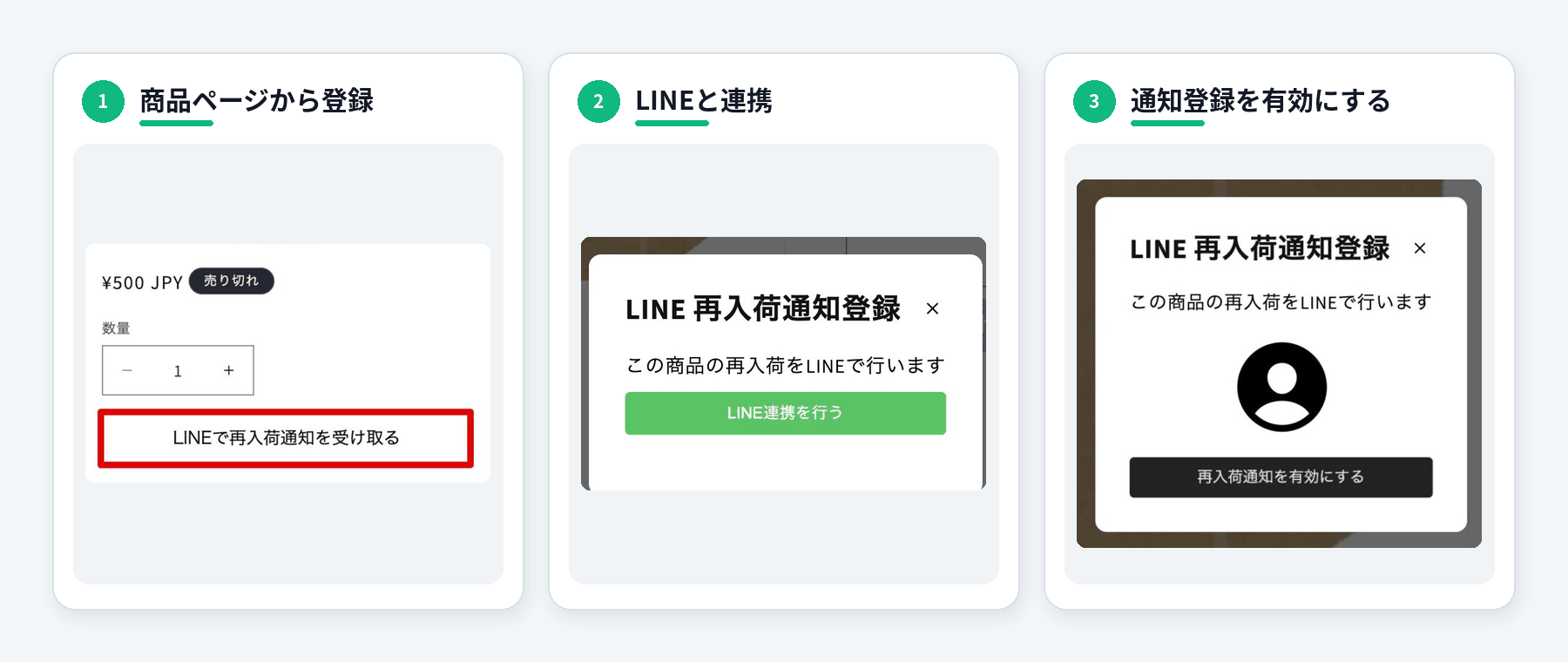
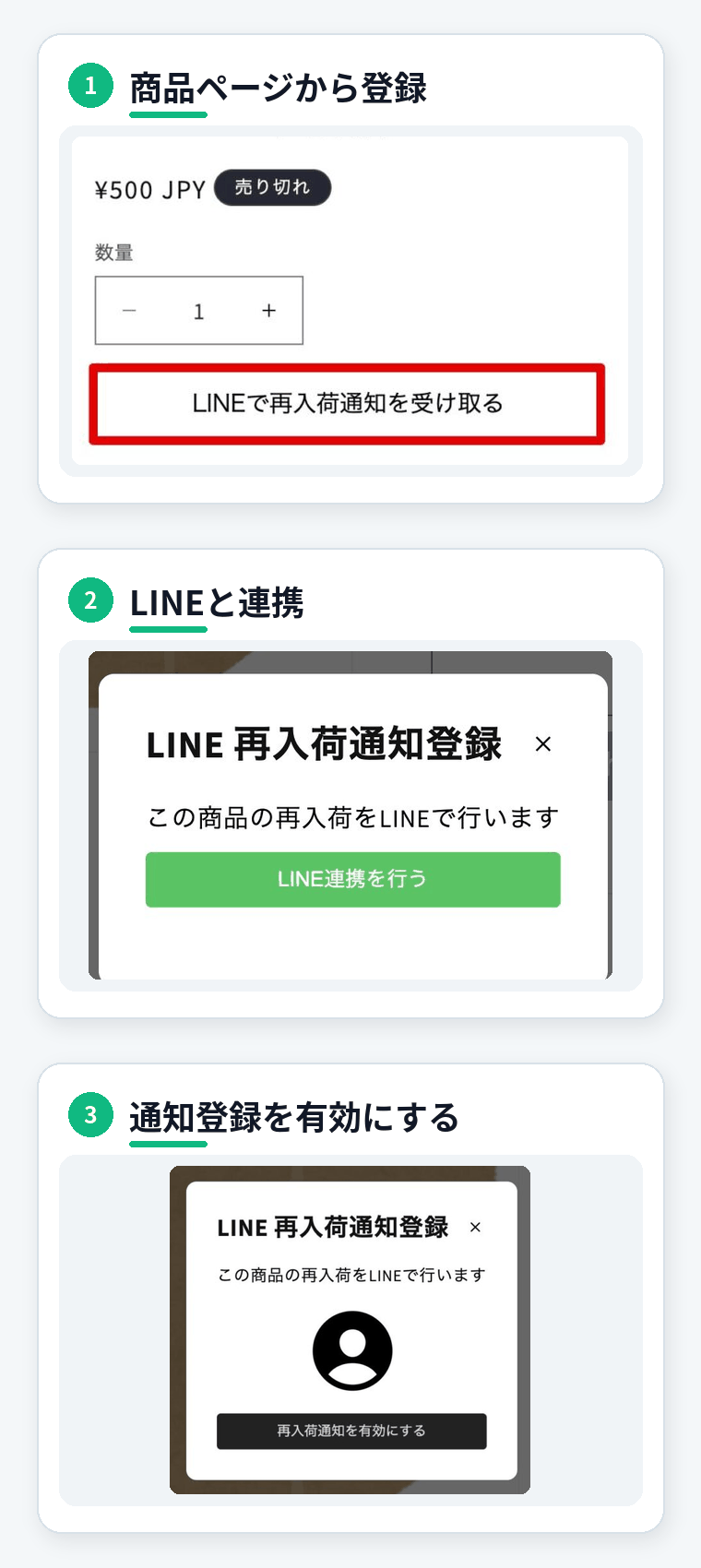
1. Tap the button on the product page
The customer starts from the "Get back-in-stock alerts on LINE" button shown on the sold-out product page.
2. Link their LINE account
The signup screen leads them into LINE linking. The first time, a step such as LINE Login is required to confirm where notifications should be sent.
3. Return to the product page and sign up
After linking, the customer returns to the product page. If post-linking auto-registration is enabled, the selected product and variant are registered automatically. Otherwise, the customer enables the LINE back-in-stock alert from the signup screen.
Here's an example of the flow where the customer returns to the product page and turns on the notification.
- With one-click signup for logged-in customers with linked LINE IDs, or with post-linking auto-registration enabled, some of these steps are skipped.
Style it to match your store
From the LINE tab under Settings > Back-in-stock settings, you can adjust the wording, color, size, corner radius, font weight, and placement of the LINE notification button on product pages — a signup path that stands out on sold-out items while staying true to your theme.
The signup screen is also configurable: title, description, button labels, colors, and the completion message can all match your store's tone.
Before you start
To use one-step LINE back-in-stock alerts, you'll need:
- StoreCRM connected to your LINE Official Account
- Messaging API and LINE Login channel configured
- The LINE back-in-stock block added to your product template
- A back-in-stock scenario created and enabled
- A pricing plan that includes back-in-stock notifications
For the initial LINE Official Account connection, see how to connect Shopify with a LINE Official Account. For how signup behaves for each login/membership and LINE-linking state, see back-in-stock login and membership settings. For back-in-stock configuration overall, see how to set up back-in-stock notifications.
Check features and pricing by plan in the pricing simulator.
FAQs
Do customers need to log in to the Shopify store?
No. By linking their LINE account, customers can sign up for back-in-stock alerts without logging in to your store. For customers who are logged in with a linked LINE ID, you can also enable one-press "one-click signup."
Can customers who haven't linked LINE sign up?
Yes. From the signup screen on the product page, they proceed to LINE linking and can register once it's complete. For logged-in customers, depending on your settings, the selected product and variant can be registered automatically when they return to the product page after linking.
Can I use this alongside email back-in-stock notifications?
Yes. You can place both email and LINE back-in-stock buttons on your product pages, giving customers more than one way to receive alerts.
Do I need a separate LINE Official Account?
Yes. You'll need a LINE Official Account for your store and connect it to StoreCRM. If you already run a LINE Official Account, you can use that account.
Which plans include this feature?
Availability depends on your pricing model. In the "email and LINE" pricing model it's available on the Pro plan or above, and the "LINE only" pricing model also has plans that include back-in-stock notifications. See the pricing simulator for current pricing and features.
Turn stockouts into your next sale with LINE
Just by linking LINE from the product page, even customers who aren't logged in to your store can sign up for back-in-stock alerts. For logged-in customers with linked LINE IDs, you can offer one-press "one-click signup" too.
Combined with email back-in-stock notifications, it's one more way to stay connected with customers waiting for your products.