
StoreCRM's shipping follow-up automatically sends post-shipping information and follow-up messages via email and LINE, separate from Shopify's standard shipping notification. Using the moment an order finishes shipping in Shopify as the trigger, you set wait times and bring everything—from delivery details to follow-up after the package arrives—into a single scenario.
Because you can also configure follow-up messages and their wait times, it works not just for a one-off message but as a full post-shipping drip sequence.
Ease pre-delivery anxiety with a post-shipping message
The window between shipping and delivery is when customers care most about where their package is. Beyond confirming the shipment, a clear message with the tracking number, contact details, and anything else needed before delivery tells customers exactly what to check next.
You don't have to stop at the shipping confirmation, either: usage tips, care instructions, and support information can follow in stages after the package arrives. By keeping delivery updates and promotions out of the same message and timing each one to fit its content, you connect the post-shipping customer experience with care.
Shipping follow-up emails outperform regular newsletters
When we aggregated actual StoreCRM delivery data, shipping follow-up emails outperformed regular newsletters and other sends on click rate, conversion rate, and revenue per email sent.
| Metric | Shipping follow-up emails | Regular newsletters and other sends | Difference |
|---|---|---|---|
| Click rate | 36.0% | 4.4% | About 8.2x |
| Conversion rate | 0.55% | 0.19% | About 2.9x |
Revenue per email sent was also about 6.6 times that of regular newsletters and other sends.
Shipping follow-up emails also tend to be opened repeatedly as customers check on their delivery, and total opens during the aggregation period exceeded the number of emails sent. While waiting for a package to arrive, customers are highly engaged with your store—making it an ideal moment to build a touchpoint.
* The aggregation period covers all deliveries in StoreCRM (excluding test sends), comprising 58,697 shipping follow-up emails and 20,909,757 regular newsletters and other emails. Deliveries whose email name or subject contains "shipping" or "shipment" (excluding those containing "schedule" or "apology") are classified as shipping follow-up; all other email deliveries are aggregated as "regular newsletters and other sends."
* Open rate is not used in the table because opens are counted cumulatively, including repeat opens of the same email.
* Conversion rate and revenue are aggregated from orders that StoreCRM attributed to each delivery (revenue is limited to orders denominated in Japanese yen; the attribution window after delivery follows the system's own logic).
* This comparison reflects observed results from StoreCRM's delivery data and does not demonstrate a causal effect of shipping follow-up messages.
Bring the whole post-shipping experience into one scenario
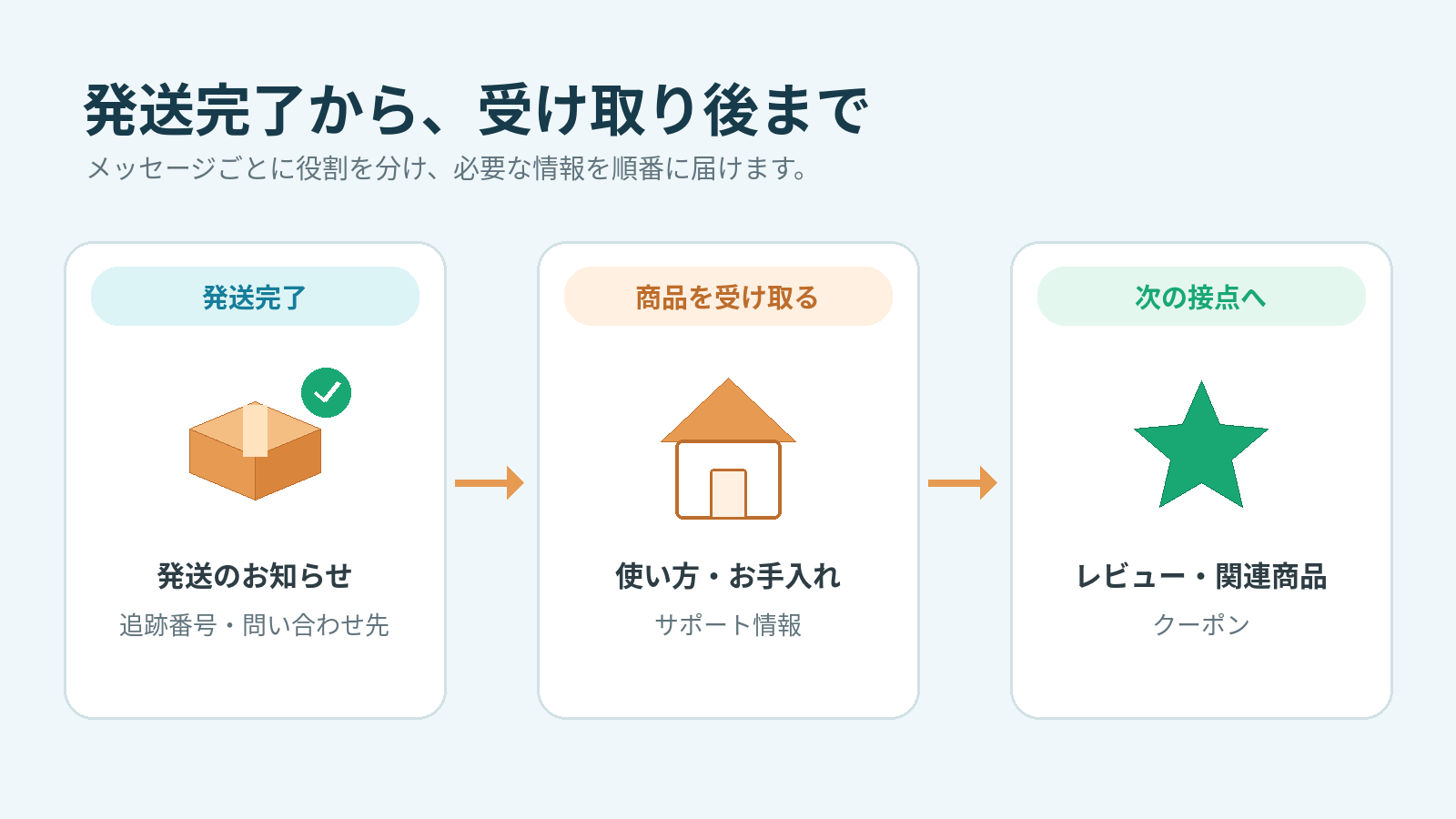
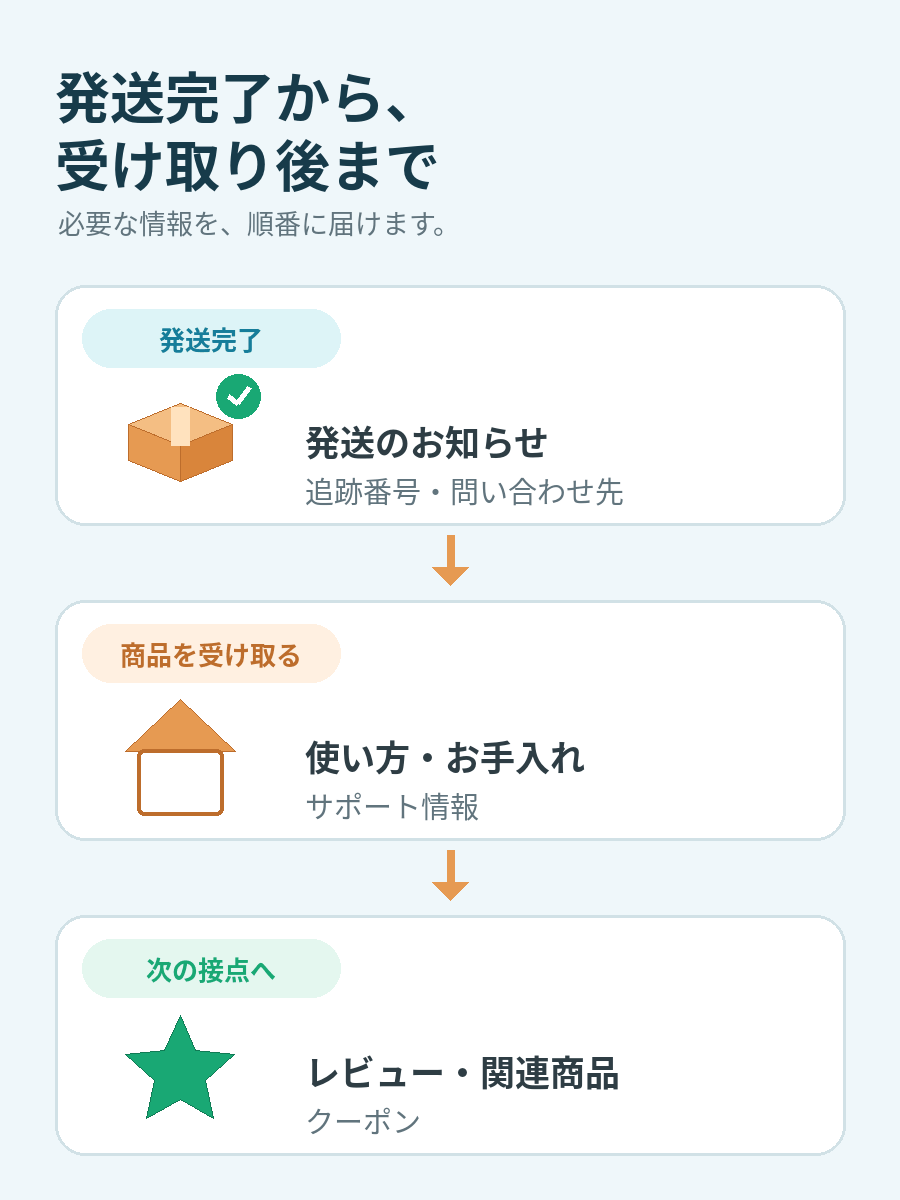
With shipping completion as the trigger, you can automate everything from pre-delivery updates to follow-up after the package arrives. Give each message its own role and timing, and the right information reaches customers in the right order.
Click the image to enlarge.
Confirm the shipment and share what customers need before delivery
The first message can announce that the order has shipped and include the tracking number, contact details, and more. Making it easy to check delivery status gives customers a clear picture of when to expect their package.
Deliver helpful information when the product is in use
Follow-up messages can cover product usage, care instructions, frequently asked questions, and where to get support. Time them to arrive around delivery, and you can answer the questions customers are likely to have right after unboxing.
Deliver messages that build the next stage of the relationship
Review requests, related-product recommendations, coupons, and more can be woven in wherever they fit the post-shipping flow. By splitting content and timing across messages, you avoid cramming everything into the initial delivery update.
Email and LINE, delivered on your schedule
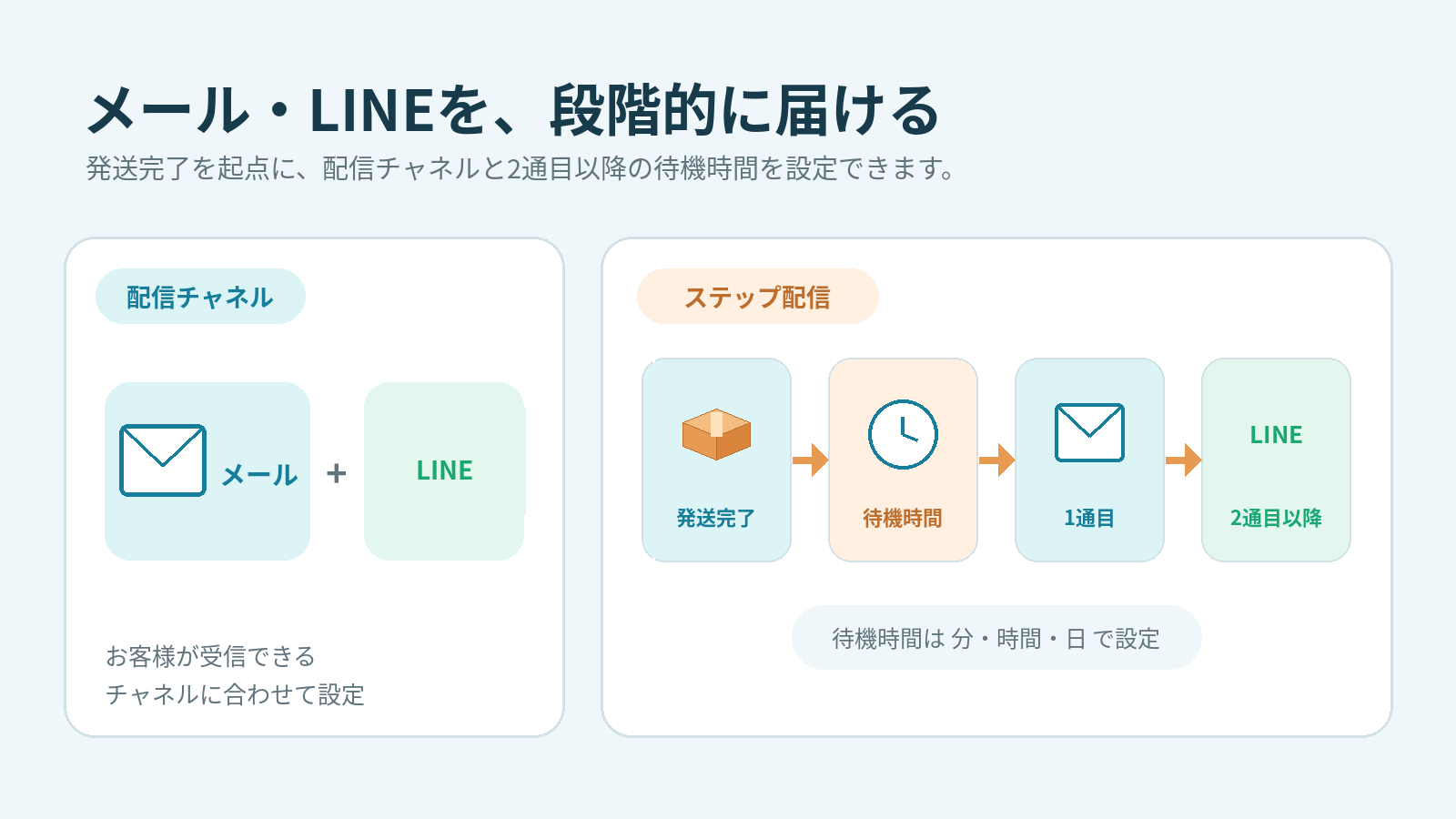
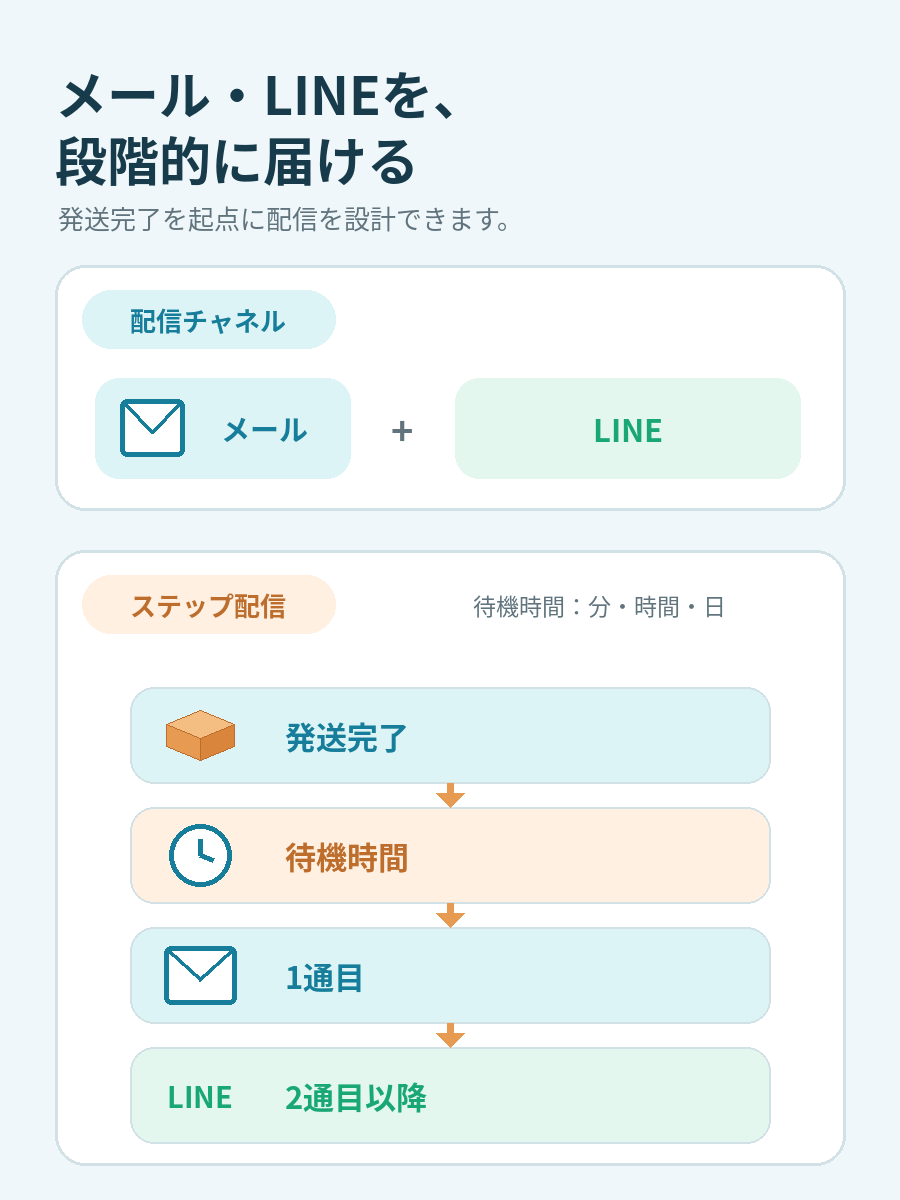
StoreCRM's shipping follow-up supports both email and LINE within a scenario. You can adjust the delay from shipping completion to the first message, as well as the wait times between the first message and each follow-up, in minutes, hours, or days.
Click the image to enlarge.
Choose the channel that fits each customer
Post-shipping follow-up can combine email and LINE. LINE delivery requires that the purchasing customer has linked their LINE ID and can receive messages, such as being a friend of your account. Email delivery also has its own requirements, such as a valid recipient and consent, which you configure to match the purpose and content of each send.
Turn follow-ups into a drip sequence
Enable "send a second message" to configure content and a wait time different from the first message. You can keep adding messages, delivering them in stages that follow the journey before and after delivery.
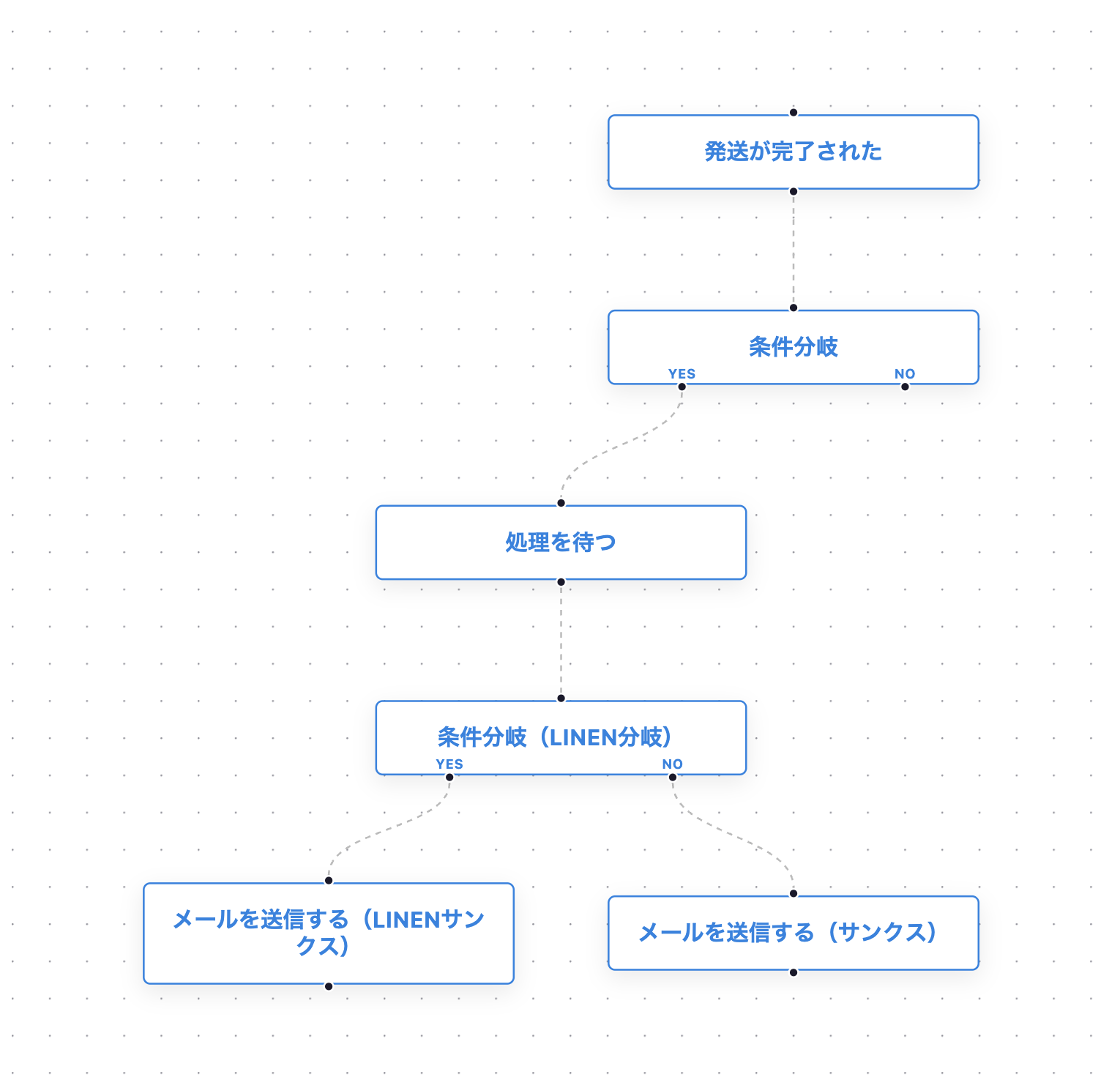
Scenario campaigns triggered by shipping completion
In the flow editor, you can combine wait steps with multiple conditional branches and place a different message on each branch. Messages route according to the conditions you set, letting you design multiple post-shipping touchpoints as a single scenario.
Click the image to enlarge.
Set the delay before sending
Choose how long to wait after the order ships before each message goes out, in minutes, hours, or days. Vary the timing to fit the content—delivery details right after shipping, a usage guide once the product has arrived.
Split shipments wait until everything has shipped
When an order ships in multiple parts, the scenario does not start when only some items have shipped. Once every item in the order has shipped and Shopify marks the order as fulfilled, the wait time you configured starts counting from that moment.
If multiple shipments produce separate tracking numbers, the message's tracking number tag inserts all of them together.
Refine the audience with conditions
Use execution conditions to narrow a scenario's audience by purchased products, customer attributes, and more. For a message to actually be delivered, the order must be linked to a customer who can receive messages on the channel you use.
Tailor the message content
Use StoreCRM's email and LINE templates, or create messages that match your store and products. Insert details like tracking numbers, and weave in related-product recommendations and coupons wherever they fit the post-shipping flow.
Review the results and improve
Delivery reports show email opens and clicks on links in your messages, plus purchases attributed to StoreCRM that occurred within your configured attribution window. Filter by scenario or message to review performance and refine content and timing.
Frequently asked questions
How is this different from Shopify's standard shipping notification?
StoreCRM's shipping follow-up is a feature for turning post-shipping communication into a scenario, separate from Shopify's standard shipping notification. Configure email, LINE, wait times, and follow-up messages to build touchpoints before and after delivery. Check for overlap with your Shopify notification settings and use each according to how your store operates.
Can I use both email and LINE?
Yes. Email and LINE messages can each be configured within a scenario. LINE delivery applies when the purchasing customer has linked their LINE ID and can receive messages, such as being a friend of your account. Email delivery also has its own requirements, such as a valid recipient and consent.
When does the message go out for split shipments (orders shipped in multiple parts)?
It is not sent when only some items have shipped. Once every item in the order has shipped and Shopify marks the order as fulfilled, the message goes out after the wait time you configured. If there are multiple tracking numbers, they are all inserted into the tracking number tag.
What kind of content can a drip sequence include?
Shipping confirmations, tracking numbers, contact details, product usage tips, care instructions, review requests, related-product recommendations, coupons, and more. Because content and wait times can differ between the first message and follow-ups, you can shape the sequence around the post-shipping customer experience.
Turn post-shipping messages into the next touchpoint
Don't let the shipping confirmation end with a single email—bring LINE and follow-up messages into one scenario. With StoreCRM, you can start a drip sequence that supports the customer experience before and after delivery.
For setup instructions, see creating emails, drip campaigns, and scenario execution conditions.