
StoreCRM's checkout abandonment notifications target customers who entered their email address, proceeded to checkout, and then left without completing their order, inviting them to resume it via email and LINE. Using the abandoned checkout as the trigger, you set a wait time and deliver the products along with a link to continue the order.
Beyond the wait time before the first message, you can also configure follow-up messages and the intervals between them. Instead of a single one-off notification, you can build a drip sequence that addresses each customer's hesitation, all within a single scenario.
Why checkout abandonment notifications matter for recovering abandoned carts
According to the average of 50 studies published by the Baymard Institute, the online shopping cart abandonment rate is 70.22% (as of July 29, 2026). This figure is an average across all carts; it is not limited to sessions that reached checkout, nor does it reflect the results of using StoreCRM. It also includes shoppers who simply were not ready to buy yet, such as those closing the page mid-comparison.
As Shopify explains, checkout abandonment refers to a session where a customer entered their email address and proceeded to checkout but never completed payment. By showing these customers the products they left behind and a link to resume the order, you give shoppers who made it almost all the way to purchase a reason to reconsider.
Some causes of cart abandonment—shipping costs, delivery conditions, a clunky checkout screen—cannot be fixed by notifications alone. Alongside improving the checkout experience itself, it is important to give customers who want to come back a clear, friction-free path to pick up where they left off.
Checkout abandonment notifications outperform regular newsletters
When we aggregated actual StoreCRM delivery data, checkout abandonment notification emails outperformed regular email newsletters on every metric: open rate, click rate, conversion rate, and revenue per email sent.
| Metric | Checkout abandonment emails | Regular newsletters | Difference |
|---|---|---|---|
| Open rate | 47.7% | 26.6% | About 1.8x |
| Click rate | 9.3% | 2.1% | About 4.4x |
| Conversion rate | 1.92% | 0.09% | About 21x |
Revenue per email sent was also about 32 times that of regular newsletters.
Customers who reach checkout have already signaled their intent to buy. Because the products and a link to resume the order arrive shortly after they leave, these messages tend to draw a stronger response than newsletters broadcast to a large audience at once.
* The aggregation period covers all deliveries in StoreCRM (excluding test sends), comprising 11,907 checkout abandonment notification emails and 19,806,367 regular newsletters. Checkout abandonment notifications are classified as automated deliveries triggered by an abandoned checkout; regular newsletters are classified as manual campaigns sent in bulk from the admin screen.
* Conversion rate and revenue are aggregated from orders that StoreCRM attributed to each delivery (the attribution window after delivery follows the system's own logic).
* This comparison reflects observed results from StoreCRM's delivery data and does not demonstrate a causal effect of checkout abandonment notifications.
Give hesitant customers a reason to resume their order
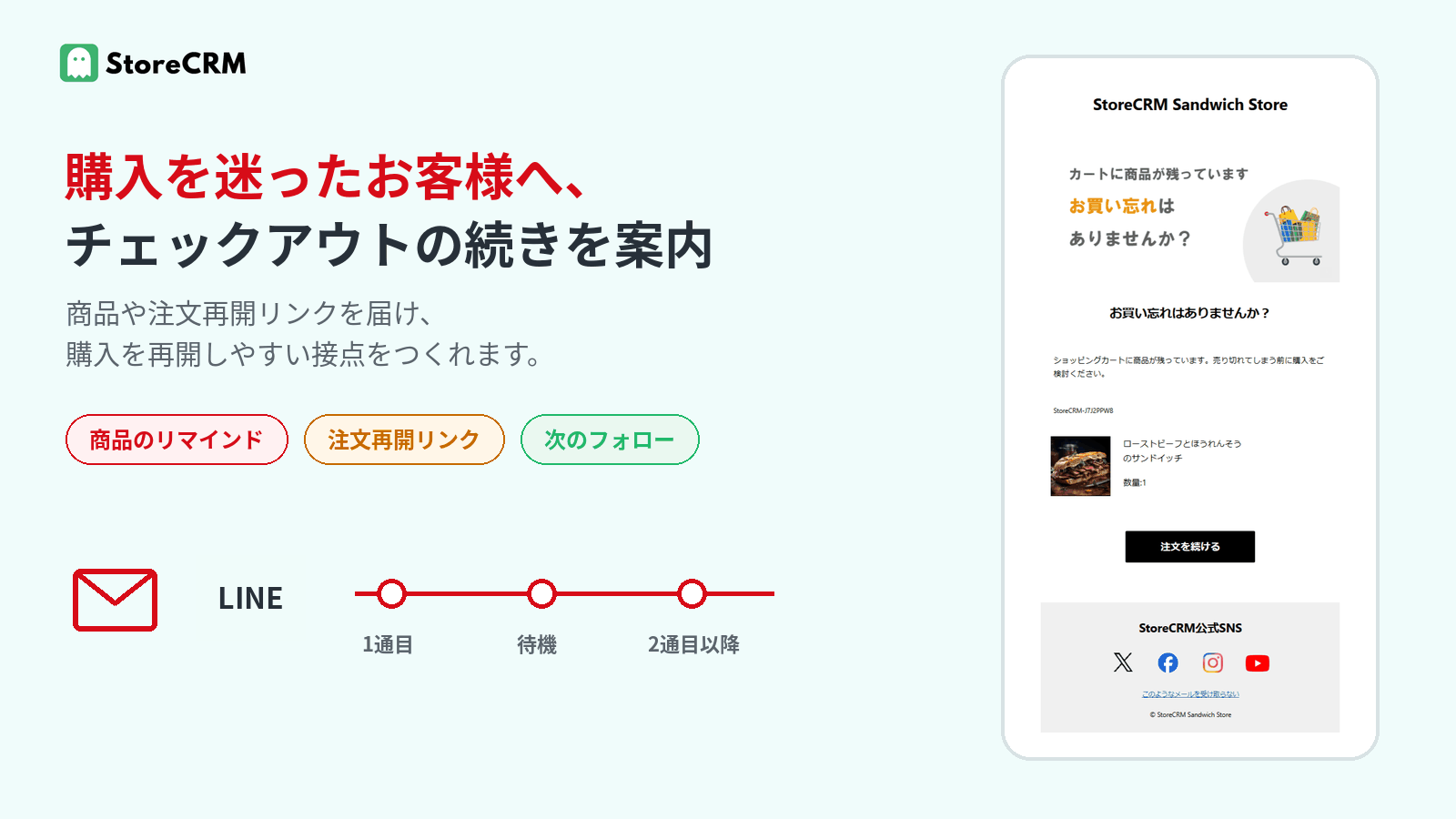
Checkout abandonment notifications are not about pressuring customers into a purchase. By delivering a link to resume the order along with the information they need to decide, you create an experience that makes it easy for customers to keep considering.
Click the image to enlarge.
Resume the order in one tap
Emails and LINE messages can include a link that takes customers straight back to their order. There is no need to search for the products again or rebuild the cart, making it easy to pick up checkout where they left off.
Answer the questions holding them back
You can add the information customers want to confirm before buying—product highlights, shipping details, contact information, and more. Rather than relying on discounts alone, your message can address exactly what is making them hesitate.
Avoid cramming everything into one message
The first message can simply show the products and invite the customer to resume the order; follow-ups can then add supplementary information, coupons, or product recommendations as needed. Giving each stage its own role means you never have to pack everything into a single message.
Email and LINE, delivered on your schedule
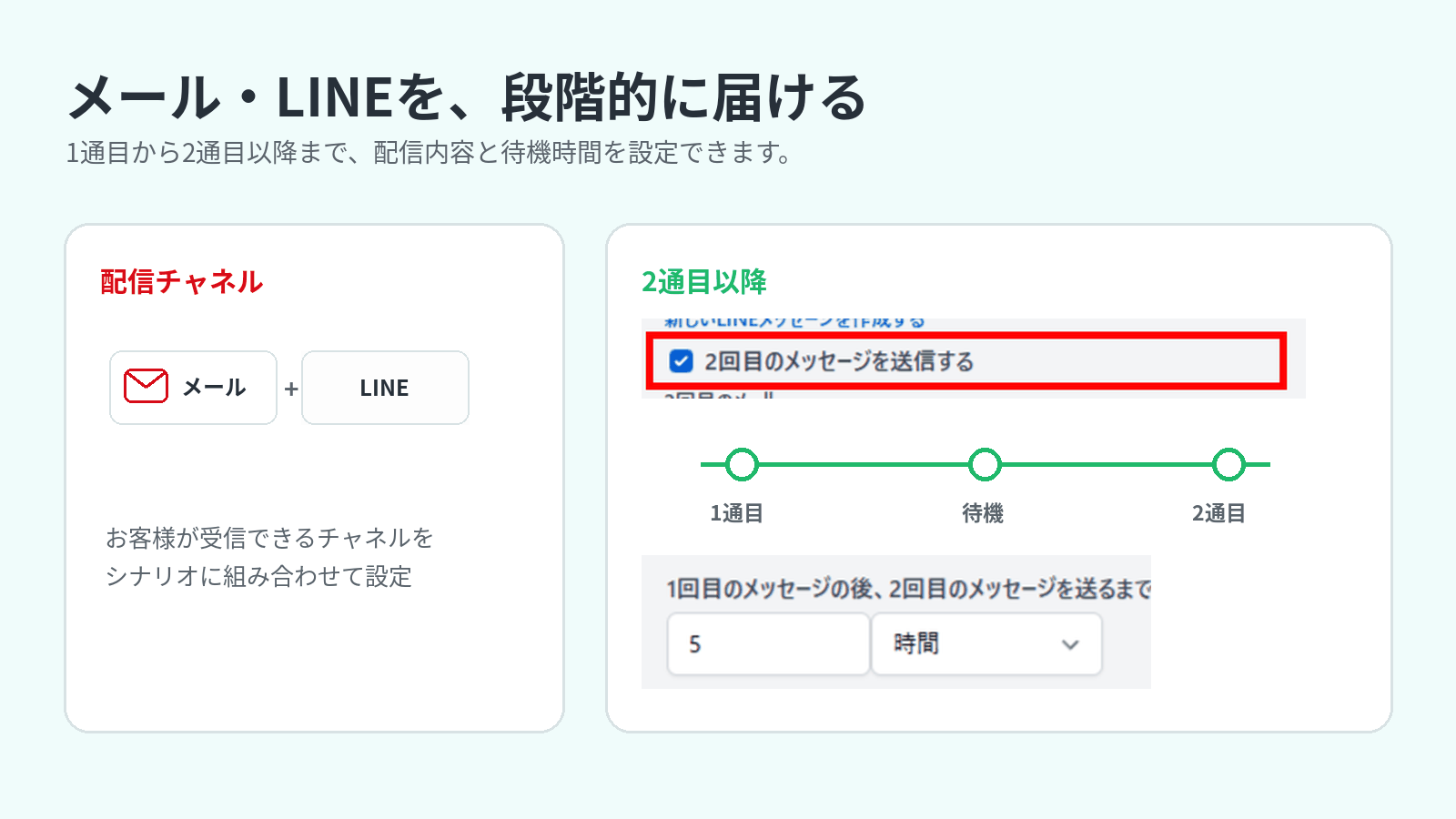
StoreCRM's checkout abandonment notifications support both email and LINE within a scenario. You can adjust the delay from checkout abandonment to the first message, as well as the wait times between the first message and each follow-up.
Click the image to enlarge.
Choose the channel that fits each customer
Scenarios can send email, LINE messages, or both. To deliver via LINE, StoreCRM must be connected to your LINE Official Account, and the customer must have linked their LINE ID and be able to receive messages from the account.
Turn follow-ups into a drip sequence
Set a wait time after the first message, then configure second and subsequent emails or LINE messages. Vary the content to match the post-abandonment journey—a product reminder, an invitation to resume the order, supplementary information, and more.
Scenario campaigns triggered by checkout abandonment
Set the delay before sending
Using an incomplete checkout with a captured email address as the trigger, you can set the wait time before the first message in minutes, hours, or days. To make sure the resume-order link works reliably, we recommend waiting at least 15 minutes due to Shopify's specifications.
Refine the audience with conditions
Narrow a scenario's audience by purchase amount, products, customer attributes, customer segments, and more. Even without conditions, the scenario targets customers who can be identified as recipients and can receive messages on the channel you use.
Tailor the message content
Use StoreCRM's templates, or create original messages that match your store and products. Once the scenario is enabled, it runs automatically according to the conditions and wait times you set.
Stop sending after purchase, then review the results
When StoreCRM detects that the target checkout has been completed or deleted, it stops any messages still in progress—so customers never keep receiving abandonment notifications after they have ordered.
Afterward, StoreCRM's reports show how the scenario ran, email opens and clicks, and the orders and revenue attributed to clicks on StoreCRM's delivery links. Treat these as indicators for reviewing timing and content, not as a measure of net incremental lift.
Adjust sending and product display based on inventory
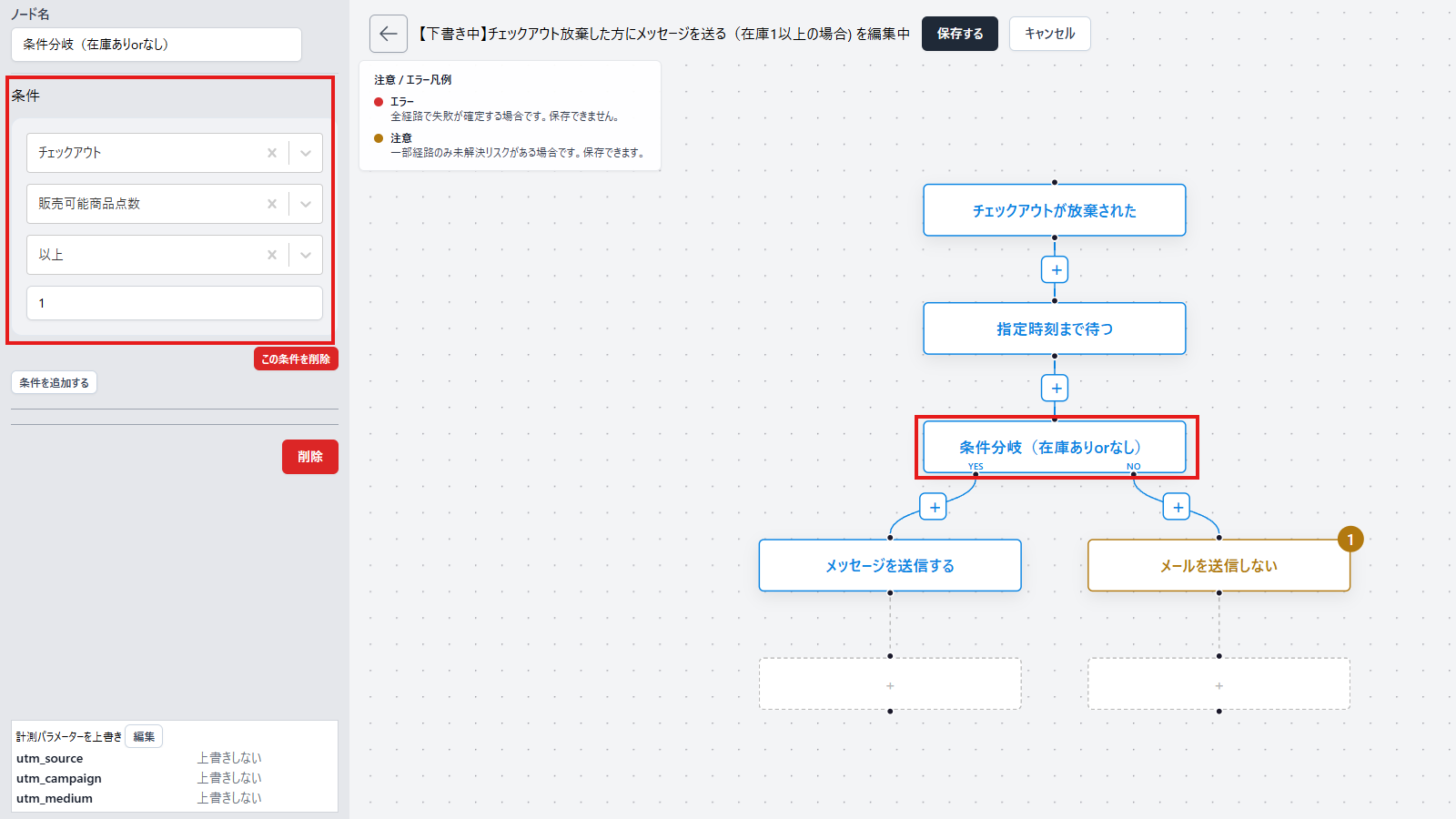
Even if inventory changes after a checkout is abandoned, you can combine conditional branches with the email's product display settings to control both whether the message is sent and which products it shows.
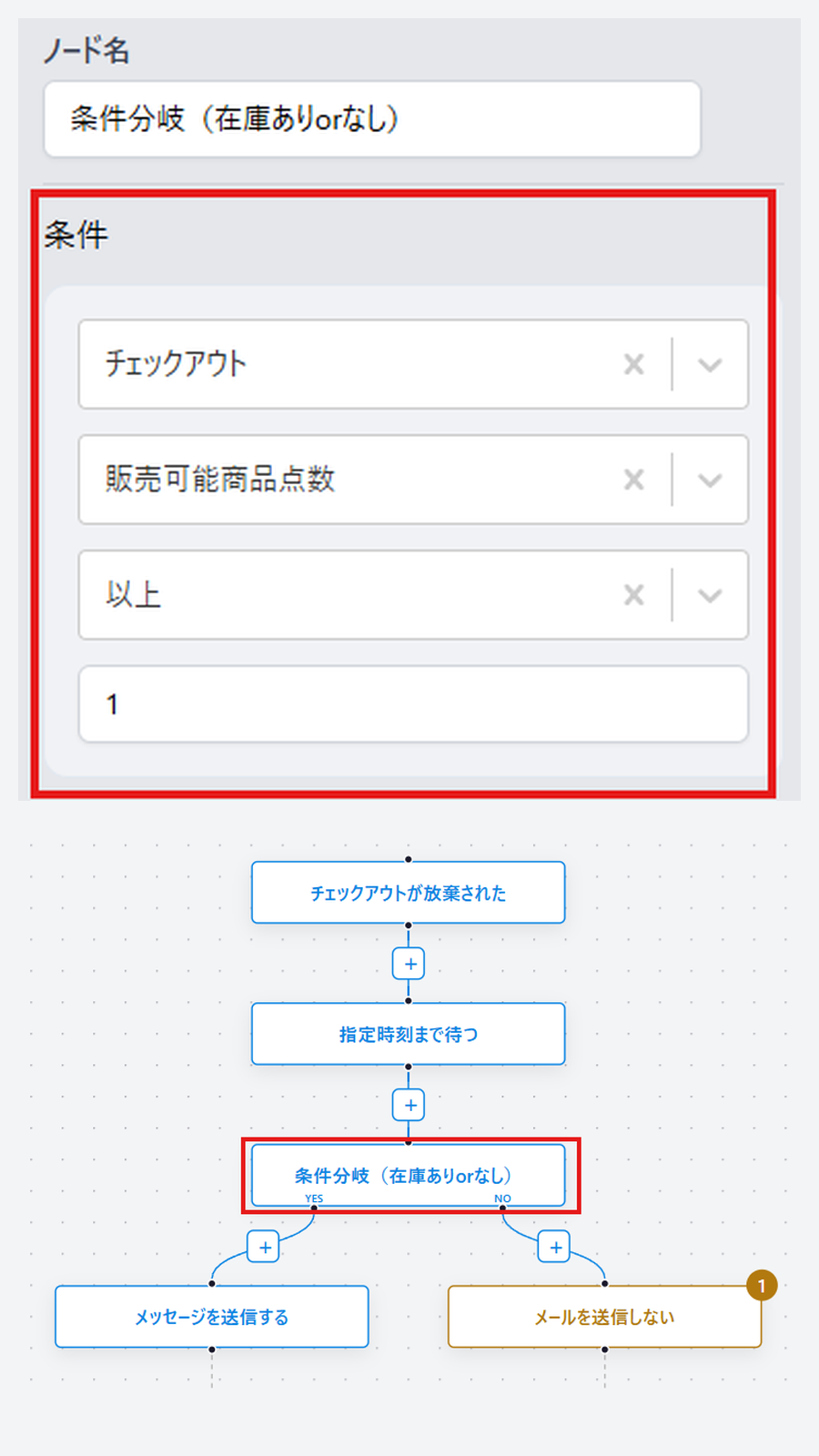
Click the image to enlarge.
Send only when items are in stock
In the flow editor's conditional branch, you can use the checkout's "number of available items" as a condition. For example, send the message when the count is 1 or more and skip it when it is 0, so the reminder only goes to checkouts that still contain in-stock products.
Automatically hide sold-out products
The email editor's Shopify cart/order block includes a setting to hide items whose stock is 0. When enabled, it automatically removes out-of-stock items from the product list at send time. This works independently of the conditional branch that controls whether the scenario sends at all, letting you fine-tune which products appear in the email.
Frequently asked questions
Are "cart abandonment" and "checkout abandonment" the same thing?
No. Cart abandonment broadly refers to any case where a customer added products to their cart but did not buy. Checkout abandonment is a subset of that: the customer proceeded to checkout and entered their email address, but did not complete the purchase.
Can I send via both email and LINE?
Yes. Each step of a scenario can include both an email and a LINE message. LINE delivery requires that StoreCRM is connected to your LINE Official Account and that the customer has linked their LINE ID and can receive messages from the account. Email delivery also has its own requirements, such as a valid recipient and marketing consent.
Can I send follow-up messages after the first one?
Yes. Set a wait time after the first message and configure the follow-ups as a drip sequence. When StoreCRM detects that the target checkout has been completed or deleted, it stops any remaining messages in the sequence.
Guide customers back to checkout on the channel they prefer
Checkout abandonment notifications are scenarios that make it easy for customers who stopped just short of purchase to resume their order. Combine email and LINE, wait times, and follow-up content to build the follow-up flow that fits your store.
For setup instructions, see checkout abandonment notifications, creating emails, and scenario execution conditions.